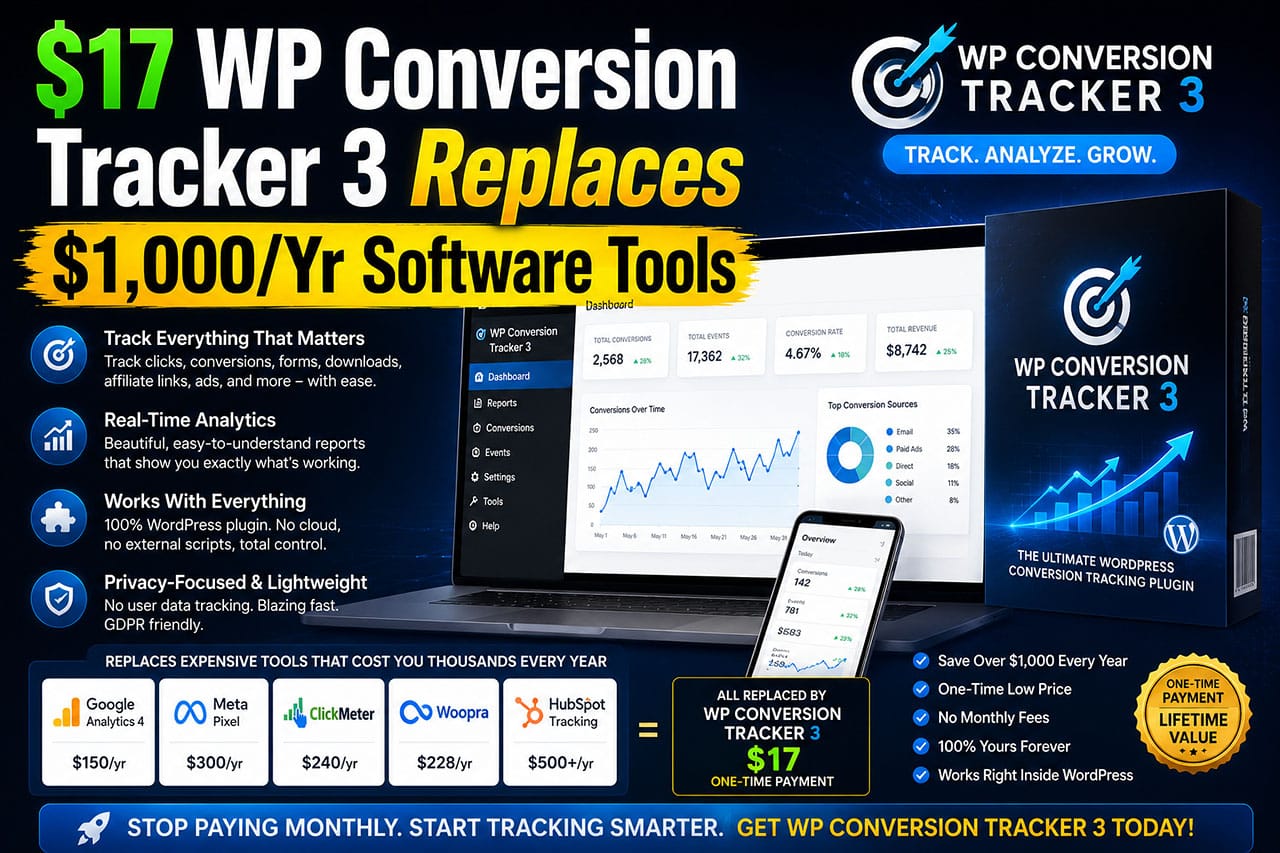
WP Conversion Tracker 3 is a powerful WordPress-based tracking solution designed for affiliate marketers, product creators, and online entrepreneurs…
…who want complete visibility into their campaigns without paying expensive monthly subscription fees.
Originally trusted by thousands of marketers since 2010, the platform has been completely rebuilt from the ground up.
It now combines modern tracking technology with an intuitive dashboard that makes campaign analysis simple and actionable.
Unlike cloud-based tracking platforms that charge recurring monthly fees and store your data on external servers…
…WP Conversion Tracker 3 runs directly on your own WordPress website.
This means you retain full ownership of your tracking data while gaining access to advanced features such as:
- conversion attribution
- revenue tracking
- country and device analytics
- hourly reporting
- split testing
- and intelligent link rotation
Everything is managed from a centralized dashboard inside WordPress, giving marketers complete control over their campaigns.
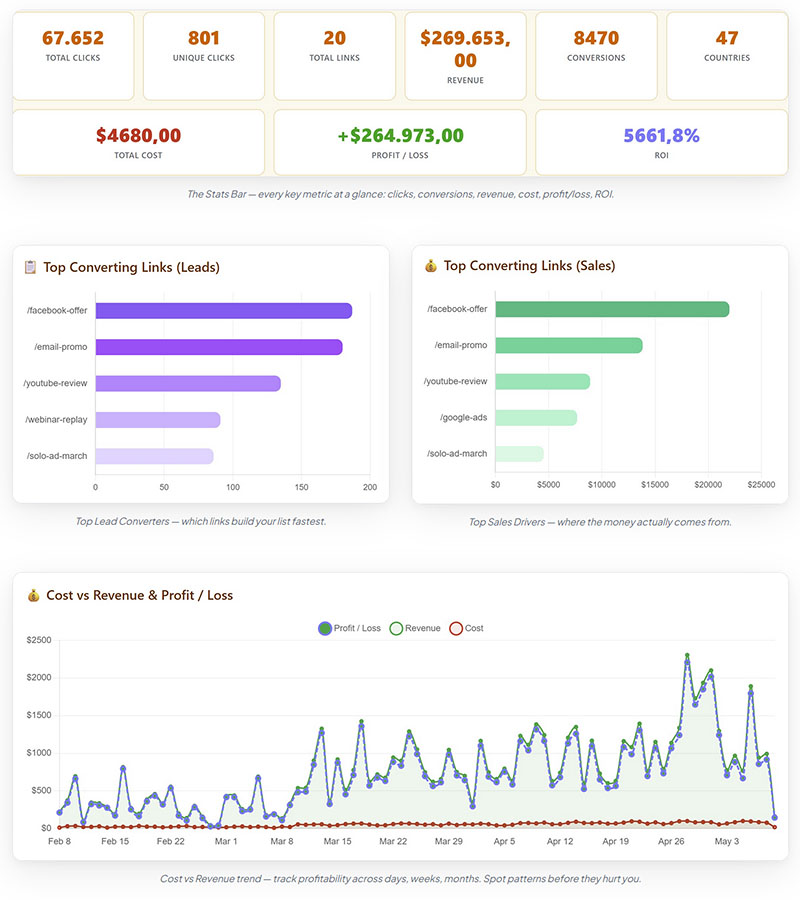 Sample Dashboard
Whether you’re promoting affiliate offers, running paid traffic, building email lists, or selling products through platforms like WarriorPlus and JVZoo…
…WP Conversion Tracker 3 provides the insights needed to make smarter marketing decisions.
Instead of guessing which campaigns are profitable, you can see exactly where clicks, leads, sales, and revenue originate.
This allows you to optimize faster, eliminate wasted ad spend, and scale what is already working.
WP Conversion Tracker 3 Review
Can This $17 WordPress Tracker Replace Expensive SaaS Platforms?
If you’re an affiliate marketer, email marketer, product vendor, or anyone running traffic campaigns online, one problem eventually becomes impossible to ignore:
You don’t know what’s actually making you money.
Sure, you can see clicks. You can see traffic. You might even see sales inside WarriorPlus, JVZoo, Stripe, or PayPal.
But can you identify which email generated the sale?
Which landing page converted best?
Which country produced the highest EPC?
Which traffic source deserves a larger budget?
Without accurate tracking, every marketing decision becomes an educated guess.
That’s where WP Conversion Tracker 3 enters the picture.
Originally launched in 2010 by Kevin Fahey, WP Conversion Tracker developed a strong reputation among affiliate marketers looking for an alternative to expensive cloud-based tracking platforms.
After several years largely out of the spotlight, the software has returned as a completely rebuilt Version 3…
…featuring modern tracking capabilities, improved reporting, and integrations designed for today’s marketing environment.
The question is:
Can a one-time-payment WordPress plugin really compete with tools that charge $89 to $119 per month?
Let’s take a closer look.
What Is WP Conversion Tracker 3?
It’s a self-hosted WordPress tracking and analytics platform.
Unlike SaaS (Software as a Service) trackers such as ClickMagick, Voluum, RedTrack, or similar cloud-based solutions…
…WP Conversion Tracker 3 runs entirely inside your own WordPress installation.
That means your tracking links, conversion data, reports, and analytics remain under your control instead of being stored on third-party servers.
The platform is designed to track:
- Clicks
- Leads
- Sales
- Revenue
- Traffic sources
- Devices
- Countries
- Referrers
- Conversion attribution
- Split test performance
- Cross-domain conversions
For many marketers, the biggest attraction is the pricing model.
Instead of paying recurring monthly fees, WP Conversion Tracker 3 is sold as a one-time $17 purchase.
However, if you’re serious about tracking your links, I recommend opting for the one-time $67 bundle instead.
This gives you so much more than the basic version and is less expensive than buying individual upgrades as one-time-offers.
I bought the bundle myself.
Installation and Setup
One of the strongest aspects of the platform is its accessibility.
Because it functions as a standard WordPress plugin, installation follows a familiar process:
- Upload the plugin
- Activate it
- Configure tracking settings
- Create tracking links
- Add conversion tracking methods
Compared to enterprise tracking systems that often require API integrations, DNS configurations, or advanced technical knowledge…
…WP Conversion Tracker 3 appears considerably more approachable for average marketers.
That said, advanced features such as postback integrations and attribution models may still require some learning if you’re new to tracking software.
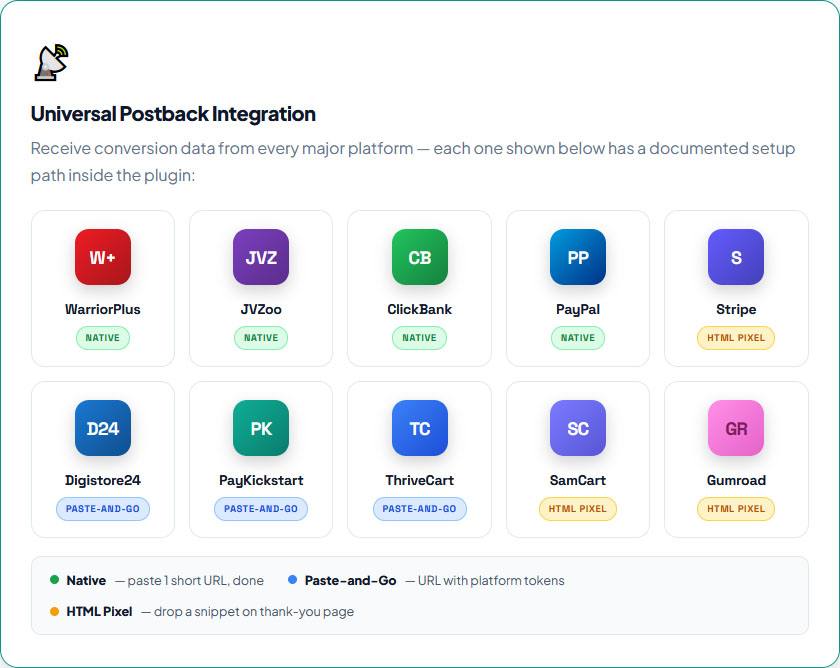
Core Features
1. Comprehensive Click and Conversion Tracking
At its core, WP Conversion Tracker 3 allows users to create unlimited tracking links and monitor their performance.
Each tracked link can collect:
- Total clicks
- Unique clicks
- Leads
- Sales
- Revenue
- Conversion rates
This provides a clear picture of which campaigns are generating results and which are simply generating traffic.
2. Revenue Attribution
One feature that separates serious tracking software from basic click trackers is revenue attribution.
Rather than simply reporting clicks and conversions, WP Conversion Tracker 3 tracks actual revenue generated by campaigns.
This allows you to identify your highest-performing traffic sources and campaigns based on profit rather than vanity metrics.
For affiliate marketers especially, this can be significantly more useful than simple click counts.
3. Six Dashboard Visualization Modes
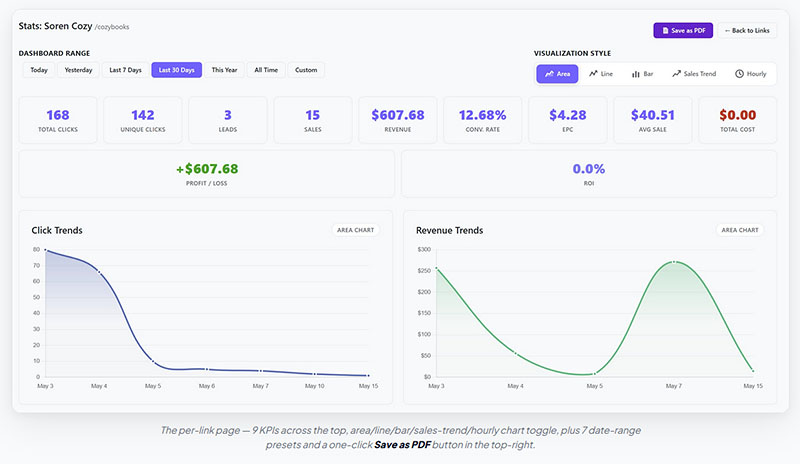
The dashboard includes multiple chart styles, including:
- Area charts
- Line charts
- Bar charts
- Sales trend charts
- Timeline reports
- Hourly heatmaps
Instead of digging through spreadsheets, users can quickly identify trends visually.
The hourly heatmap is particularly interesting because it highlights exactly when traffic and conversions occur throughout the day.
4. Country and Device Analytics
Knowing where your visitors come from matters.
The platform tracks:
- Country-level traffic
- Geographic conversion patterns
- Desktop users
- Mobile users
- Tablet users
This can reveal insights that many marketers overlook.
For example, one traffic source may appear profitable until you discover that nearly all conversions come from a specific country segment.
5. First Click and Last Click Attribution
Attribution is one of the most debated topics in digital marketing.
WP Conversion Tracker 3 allows users to choose between:
- First-click attribution
- Last-click attribution (the default)
This flexibility helps marketers determine whether the original click or the final touch-point deserves credit for the conversion.
Advanced Features
Split Testing
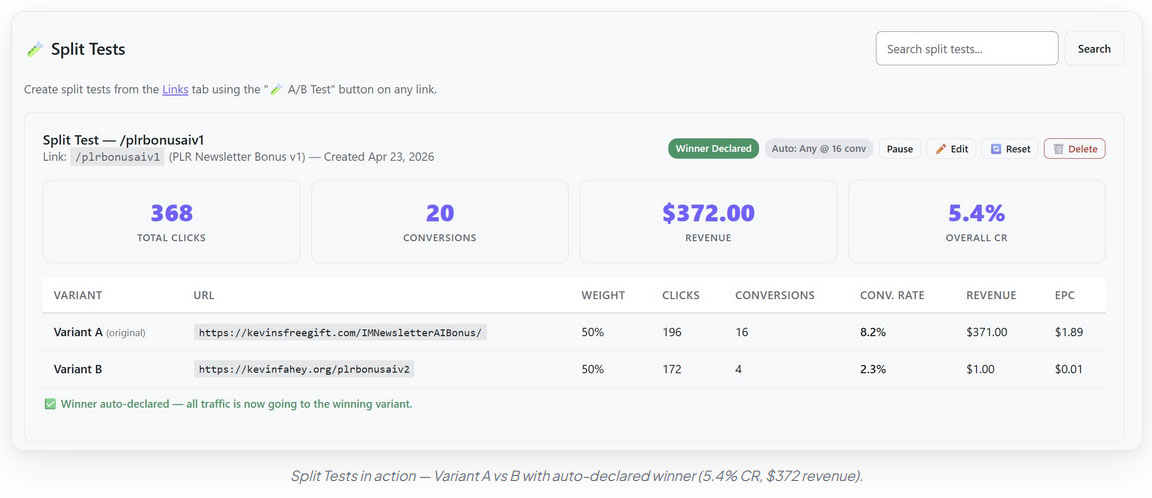
The Pro Tools add-on (included in the bundle) introduces A/B testing functionality.
Users can:
- Test multiple destination URLs
- Allocate traffic percentages
- Compare conversion rates
- Compare revenue generated
Instead of guessing which landing page performs best, marketers can make decisions based on actual conversion data.
Link Rotation
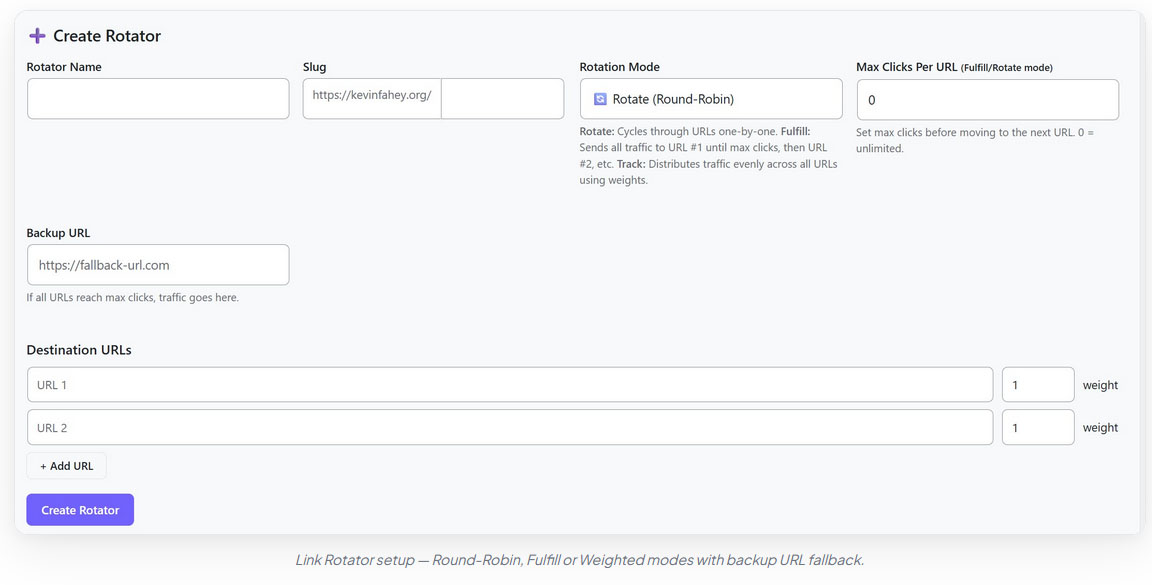
Three rotation modes are available:
- Round Robin
- Weighted Rotation
- Fulfill Rotation
These options make it possible to distribute traffic intelligently across multiple offers or pages.
QR Code Tracking
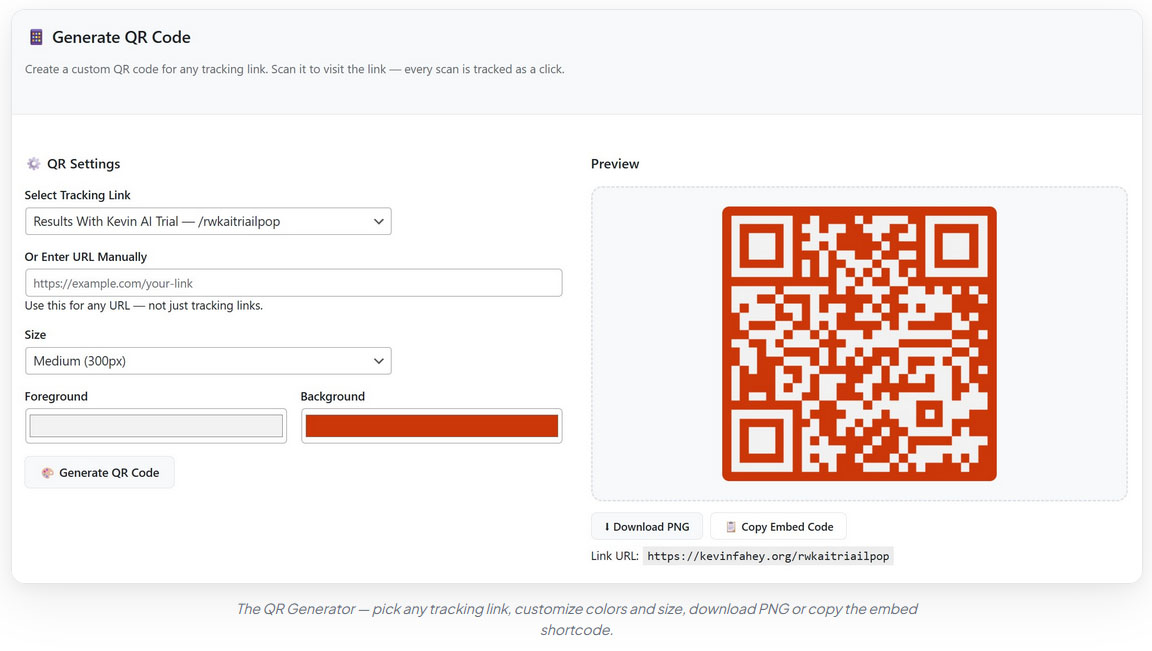
This feature stands out because it bridges offline and online marketing.
Users can generate trackable QR codes and monitor:
- Scans
- Clicks
- Conversions
- Revenue attribution
This could be valuable for direct mail campaigns, business cards, event marketing, and local promotions.
YouTube now allows creators to place QR Code ads in videos, so that’s another use for them.
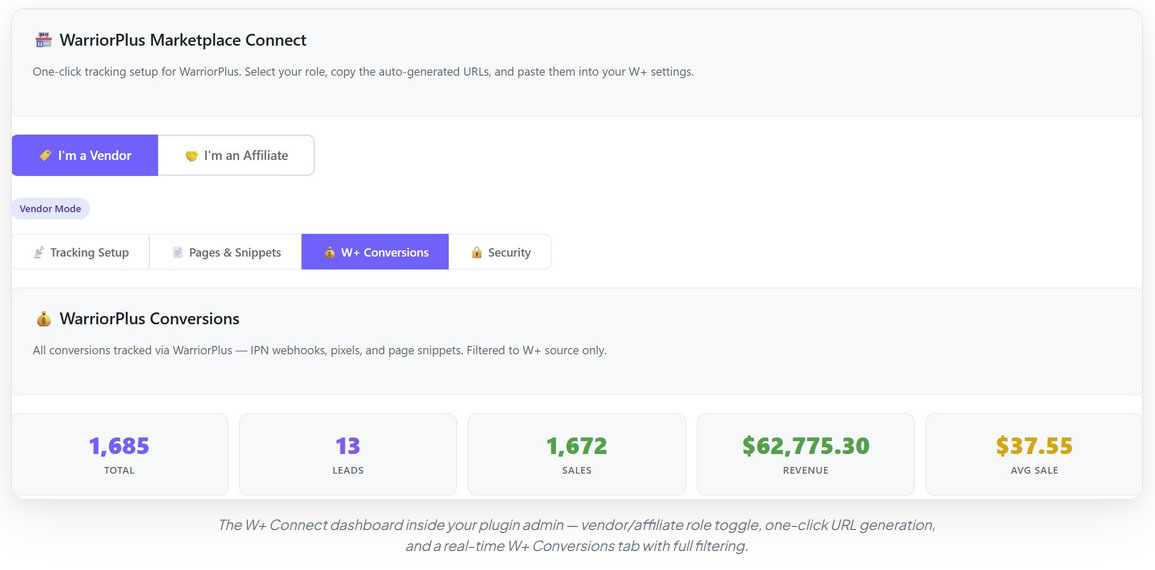
WarriorPlus and JVZoo Integration
Affiliate marketers using WarriorPlus or JVZoo will likely appreciate the dedicated integrations.
The software supports:
- Sale tracking
- Refund tracking
- Rebill tracking
- Vendor mode
- Affiliate mode
- Revenue attribution
Instead of manually piecing together reports from multiple platforms, users can centralize performance data inside WordPress.
Cross-Domain Tracking
Cross-domain tracking has become increasingly important due to browser privacy restrictions.
Many marketers send traffic from:
Landing Page → Checkout Page → Thank You Page
When those steps occur across different domains, attribution often breaks.
WP Conversion Tracker 3 uses URL parameters and local storage to help preserve attribution across domains.
While no browser-based tracking solution is perfectly immune to modern privacy restrictions, the approach appears designed to address one of the most common tracking problems marketers face today.
Pricing
At the time of writing:
Core Version: $17
Complete Bundle: $67 (best value)
Compared with subscription trackers that often exceed $1,000 annually, the pricing is undeniably aggressive.
For marketers who dislike recurring software fees, this may be one of the platform’s strongest selling points.
Pros
Affordable Entry Price
- The low upfront cost makes advanced tracking accessible to smaller marketers.
Self-Hosted
- You retain ownership of your data and infrastructure.
Strong Feature Set
- Revenue attribution, split testing, link rotation, QR tracking, and postback integrations create a surprisingly comprehensive package.
WordPress Integration
- Everything lives inside a familiar environment.
No Recurring Fees
- Potential long-term savings compared with SaaS alternatives can be substantial.
Cons
WordPress Only
- If your business does not operate on WordPress, this solution may not be suitable.
Learning Curve
- Advanced tracking concepts such as attribution models, postbacks, and split testing still require some understanding.
Limited Independent Review Coverage
- One limitation I encountered while researching this review is the lack of extensive independent third-party testing. Most published reviews currently available appear to be affiliate reviews or promotional reviews. While this doesn’t mean the software lacks quality, prospective buyers should understand that broad independent validation is still relatively limited……….
Final Verdict
WP Conversion Tracker 3 occupies an interesting position in the tracking market.
It isn’t trying to be a massive enterprise platform.
Instead, it focuses on providing marketers with the core analytics, attribution, and optimization tools they need while eliminating recurring subscription fees.
For WordPress users, especially affiliate marketers, email marketers, WarriorPlus affiliates, JVZoo vendors, and product creators, the value proposition is compelling.
The combination of:
- Self-hosted ownership
- Revenue tracking
- Split testing
- Link rotation
- Country analytics
- Device reporting
- Cross-domain tracking
- One-time pricing
…makes it one of the more intriguing tracking solutions currently available for WordPress users.
If you’re currently paying hundreds or thousands of dollars per year for tracking software, WP Conversion Tracker 3 is certainly worth evaluating.
Rating:  9/10 (Highly Recommended)
Best For: Affiliate marketers, email marketers, product vendors, WordPress site owners, and anyone seeking a self-hosted alternative to subscription-based tracking platforms.

If you’ve ever opened your affiliate dashboard and wondered why some campaigns succeed while others fail, you’re not alone.
Most marketers spend hours creating content, sending emails, buying traffic, and promoting offers. Then they log into their affiliate platform and see a few sales trickle in.
The problem?
They have no idea where those sales actually came from.
- Was it the email sent yesterday?
- The Facebook post from three days ago?
- The YouTube video from last month?
- The solo ad campaign that cost $100?
Without proper tracking, every decision becomes a guess.
And guessing is expensive.
Many marketers keep spending money on traffic sources that aren’t profitable while ignoring the campaigns that quietly generate the best results.
They can’t see which countries convert best, which devices produce buyers, or which landing pages outperform the rest.
That’s why serious marketers obsess over tracking.
By the end of this article, you’ll understand why accurate tracking is one of the highest ROI activities in online marketing…
…and how to implement it without paying hundreds of dollars every month.
Why This Is Harder Than It Should Be
The obvious solution seems simple.
Sign up for a tracking platform.
Unfortunately, that’s where many marketers hit a wall.
Popular tracking tools often come with recurring monthly fees that range from $89 to over $119 per month.
Over a year, that’s easily more than $1,000 spent just to monitor clicks and conversions.
If you use WordPress, you can get plugins like Pretty Link or ThirstyAffiliates that track links for you…
…but they do so at an annual cost, though is is lower than tracking tool services costs.
The cost isn’t the only issue.
Many tracking platforms are loaded with features most marketers never use.
Complex dashboards, steep learning curves, external servers, and subscription dependencies create unnecessary friction.
Even worse, your business data lives on someone else’s platform.
If you cancel your subscription, lose access, or experience service interruptions, critical campaign information can disappear.
As marketing becomes more competitive, relying on incomplete tracking data becomes increasingly dangerous.
The marketers who consistently scale campaigns aren’t necessarily better marketers.
They simply have better information.
They know what works because they’re measuring everything.
What Is the Best Way to Track Affiliate Link Performance?
The best affiliate marketers track four critical metrics:
- Clicks
- Conversions
- Revenue
- Attribution
Most beginners focus only on clicks.
That’s a mistake.
A campaign generating 1,000 clicks might produce less profit than a campaign generating only 100 clicks.
Revenue attribution changes everything.
When you know exactly which links, campaigns, countries, devices, and traffic sources produce revenue, optimization becomes straightforward.
Instead of guessing, you make decisions based on evidence.
This is where modern tracking systems have evolved far beyond simple click counters.
Today’s most effective tracking setups provide:
- Hourly conversion analysis
- Country-level reporting
- Device segmentation
- Split testing
- Link rotation
- Revenue attribution
- Cross-domain tracking
- Conversion integrations
Rather than simply counting traffic, they reveal why traffic converts.
One particularly interesting approach comes from WP Conversion Tracker 3 (a new WordPress plugin).
Instead of operating as a cloud-based subscription platform, it runs directly inside WordPress…
…allowing marketers to maintain ownership of their tracking data while gaining access to advanced analytics normally associated with premium SaaS tools.
The result is a system that combines detailed reporting with complete control over data and infrastructure.
How It Works and What To Do
The process begins by creating trackable links inside your WordPress site.
Every click is recorded automatically.
From there, the system starts collecting valuable information including:
- Visitor location
- Device type
- Referring source
- Time of click
- Conversion activity
- Revenue generated
As traffic accumulates, patterns become visible.
You may discover:
- USA traffic converts significantly better than international traffic
- Desktop users generate more sales than mobile users
- Emails sent at specific times consistently outperform others
- One landing page converts 2X better than another
The software also includes split testing capabilities, allowing marketers to compare multiple destinations against each other.
Link rotation functionality enables traffic distribution across different offers, landing pages, or campaigns.
For marketers using affiliate networks such as WarriorPlus and JVZoo, direct integrations simplify conversion tracking and revenue attribution.
You can learn more about the platform and its capabilities here >>
One particularly useful feature is cross-domain tracking.
Since many affiliate funnels involve multiple domains, maintaining attribution across the customer journey can be challenging.
Advanced tracking methods help preserve conversion data even when visitors move between websites.
This creates a much clearer picture of what is actually generating revenue.
Proof and Results
The real value of tracking appears when marketers begin making better decisions.
Imagine discovering:
- One email generated 47 clicks and 2 sales
- Another generated 120 clicks but no revenue
- Traffic from one country converts three times better than another
- A specific landing page improves conversions by over 200%
Those insights directly impact profitability.
Instead of scaling everything, marketers scale winners.
Instead of wasting money on underperforming campaigns, they eliminate them.
WP Conversion Tracker reports include detailed performance metrics such as:
- Click counts
- Unique visitors
- Leads
- Sales
- Revenue
- Conversion rates
- Earnings per click
- Average sale values
Combined with hourly heatmaps, country reports, device tracking, and conversion logs, marketers gain visibility into the entire customer journey.
This level of reporting allows campaigns to improve continuously over time.
Small optimization decisions accumulate into significant increases in profit.
Conclusion
The biggest difference between struggling marketers and successful marketers isn’t usually traffic.
It’s visibility.
When you know exactly which campaigns, links, traffic sources, devices, and countries generate revenue, optimization becomes simple.
You stop guessing.
You stop wasting money.
And you start making decisions based on real data.
If you’re currently paying monthly fees for tracking software or avoiding tracking entirely because the tools seem too expensive…
…it may be worth exploring a WordPress-based alternative that provides advanced analytics without ongoing subscription costs.
You can see the complete details of WP Conversion Tracker 3 here.
The interesting question isn’t whether tracking matters.
It’s how much additional profit you’re leaving on the table by not knowing what’s actually working.

What is a WordPress link tracking plugin?
A WordPress link tracking plugin allows marketers to monitor clicks, conversions, traffic sources, revenue, and visitor behavior directly from their WordPress website.
Why is affiliate tracking important?
Affiliate tracking helps marketers identify profitable campaigns, eliminate underperforming traffic sources, and improve ROI through data-driven decisions.
Can I track conversions across different domains?
Yes. Modern tracking solutions use URL parameters and local storage methods to maintain attribution even when visitors move between domains.
Do I need any technical skills to set this up?
Nope. If you can install a WordPress plugin, you can set this up. Upload, activate, and you’re tracking in under 10 minutes. No coding, no APIs, no confusion.
Is this really a one-time payment? No hidden fees?
100%. You pay once – $17 for Core or $67 for the Complete Bundle – and it’s yours forever. No monthly fees. No annual renewals. No surprise charges. Ongoing updates included.
What’s included in the complete bundle?
Everything! The Core Tracker plus all 5 add-ons: PRO Tools (split testing, link rotation, IP activity), Link Importer (CSV import), WarriorPlus Connect (full W+ integration), JVZoo Connect (full JVZoo integration), and QR Codes (generate trackable QR codes). All installed as one package.
Can I buy addons individually if I only get the Core version?
Yes! Each add-on is available as an individual upgrade. But the Bundle saves you over $115 compared to buying everything separately. Locked add-ons show as tabs in the plugin so you can upgrade anytime.
How is this different from ClickMagick or Voluum?
Those are cloud-based SaaS tools that charge $89–$119/month and hold your data hostage. WP Conversion Tracker lives on YOUR WordPress site. You own the data. You control everything. And you pay once instead of forever.
How does First Click/Last Click attribution work?
First Click credits the conversion to the link that originally brought the visitor to your site. Last Click credits the most recent link they clicked before converting. Set a global default in Settings, then override per-link if needed for granular control.
How many sites can I use the plugin on?
Your license covers up to 5 domains. You can manage activations directly from the plugin settings. Need more? Developer licenses are available for 25, 50, or 100 sites.
Do I need both W+ Connect and JVZoo Connect?
Only if you use both platforms. If you only sell/promote on WarriorPlus, you just need W+ Connect. If you only use JVZoo, you just need JVZ Connect. The Bundle includes both.
Will this slow down my website?
Not at all. The tracker is lightweight and runs entirely on your server. No external API calls on page load. No bloated JavaScript. Your visitors won’t notice a thing.
Do I get updates?
Yes! Ongoing updates. Updates are delivered through WordPress’s native update system. One click and you’re running the latest version. Forever.

All the best,
Gary Nugent
P.S.: Don't forget, if you want to create an internet income of your own, here's one of my recommended ways to do that: