
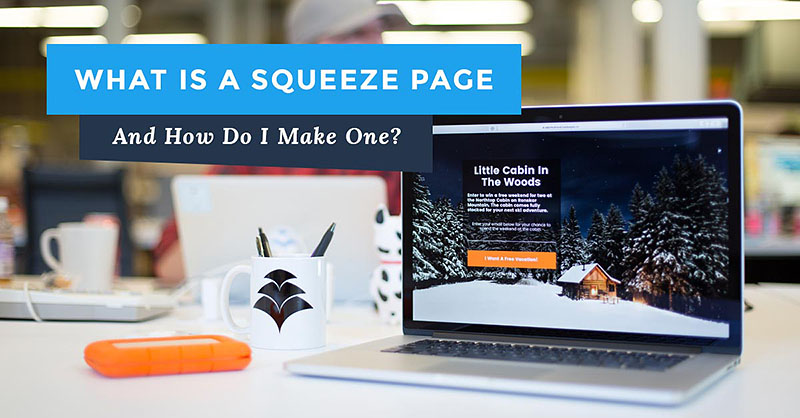
What Is A Squeeze Page?
You can think of a Squeeze Page as a specialized type of Landing Page.
These pages contain an opt-in form that asks the visitor to provide their email address and sometimes their name in return for something.
That might be to sign up to a mailing list; to receive a free gift; to register for a webinar, etc.
That free gift could be a report, ebook, a video tutorial or some software.
Or it may be to access some more detailed information about what you’re offering.
But the bottom line is that you’re building your email list as people sign up on your squeeze page.
While a landing page can be a squeeze page, it can also be a standard sales page for a product, one that doesn’t ask a visitor to join a list.
So “landing page” is a somewhat broader term.
What Is a Landing Page & Is it Different To a Squeeze Page?
“Landing pages” is a general term given to any page where you directly send traffic.
While they can be regular blog posts and pages, they are more usually pages that present an offer, product, service or optin form to a visitor.
A squeeze page is a specialized type of landing page whose purpose is to collect the email addresses, and possibly names, of page visitors.
The Need For An Autoresponder Service
On the other side of a squeeze page is an autoresponder service, also known as an email service provider.
This actually collects and stores your subscribers’ email addresses and names.
It’s also the tool you’ll use to send out emails and newsletters to your list.
Since these services require physical resources (servers), they are not free.
You need to factor in the monthly cost of an autoresponder service into your business budget.
Most services work on an escalating price model.
You pay a certain fee to send out a certain number of emails to a certain number of subscribers each month.
Each autoresponder has its own limits.
Some Autoresponder Mini-Reviews For Building a Squeeze Page
This isn’t an exhaustive list of autoresponders but it does contain the most popular email list building services.
I’ve listed the various limits each imposes and their prices.
All autoresponders provide tools for creating opt-in pages.
However, these are generally fairly basic and if you want more control over how your opt-in pages work and to make them more dynamic, then it’s better to use a separate tool to create a squeeze page (see below for suggestions).
1. Systeme.io
Systeme is the newest entry in this list and it is much, much more than an autoresponder.
It is actually an all-in-one marketing platform for creating sales funnels, pages, courses and blogs…
…that just happens to include a free email service provider and is a worthy alternative to Clickfunnels (I switched to Systeme from Clickfunnels myself).
While Systeme does offer a number of paid plans (you can learn more about the platform here), it also offers a Free-For-Life plan that is ideal if you’re just starting out with list building and email marketing:
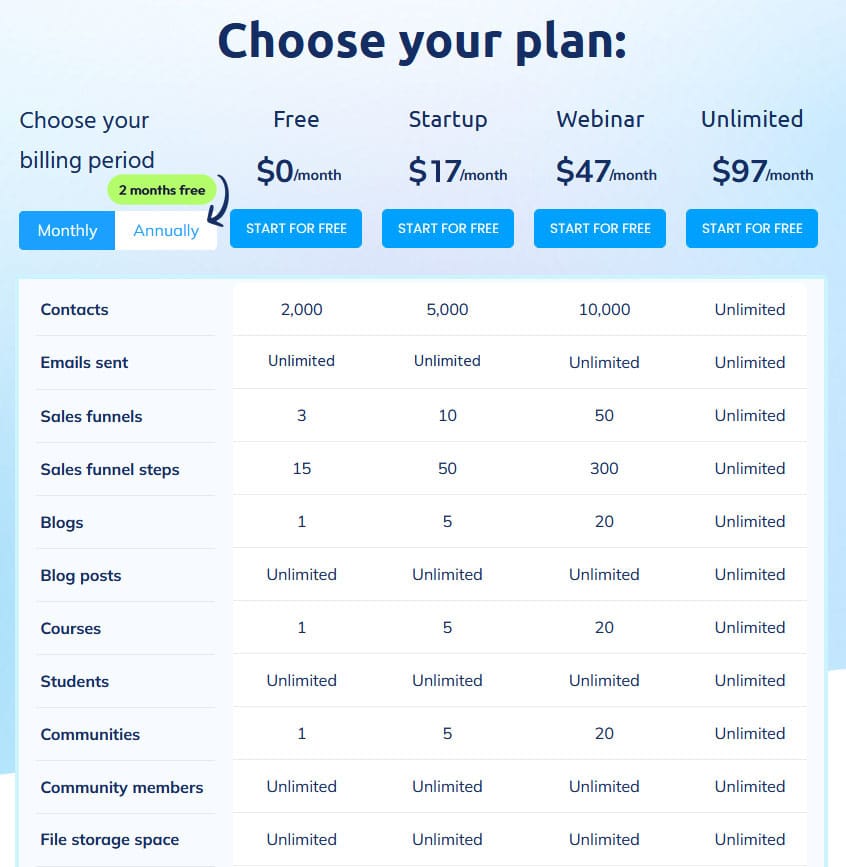
This isn’t the full list of features for each account. You’d need to check the Systeme Pricing page to see all the included features. You can save 30% on fees if you pay annually
As you can see, you can collect up to 2,000 subscribers on the free plan and you can send an unlimited number of emails.
The restriction is that you can only create one list (what they call Tags) and one email campaign to go along with it.
But that’s more than enough to get started with list building and turning your subscribers into paying customers.
Their paid plans compare very favourably to the pans offered by dedicated email services providers.
And you get all the extra tools for building business assets that other autoresponders do not include.
In fact, if you were looking at Clickfunnels or Builderall as marketing platforms, Systeme offers far better value than both.
If you’re interested in Systeme, I’m offering a huge bonus package to you, even if you only sign up for the free plan.
Here are some Systeme resources:
- An inside look at Systeme and how it works (scroll down to the 8 videos at the end of the page)
- Free Systeme Certification Course
Systeme offers a free-to-join affiliate program that pays 60% commissions; you do have to open a free account with them as that’s where you’ll find your affiliate dashboard.
Here’s a free ebook that shows you how you can build an income promoting Systeme.
2. SendShark
SendShark is a powerful email platform built by marketers for marketers.
It gives you all the tools you need in one place, plus the delivery rates are great.
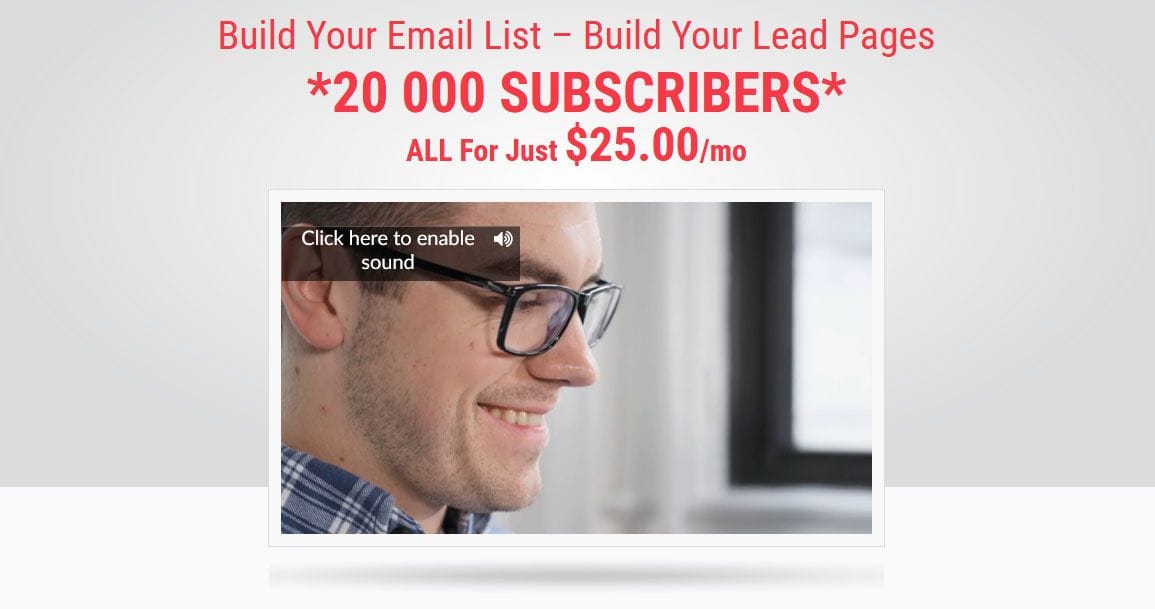
It doesn’t have the advanced features of some of the other autoresponders (such as Workflows or graphic design tools) but what it does give you is up to 20,000 subscribers for a flat $25 per month.
Almost all the other autoresponders would be charging hundreds of dollars per month for that number of subscribers.
There’s also no limitation on the number of emails you can send out each month and you can create lead capture pages with it too.
 There’s not much else to say about SendShark – it was built for email marketers to provide the basic services that they need.
3. Kit
This autoresponder, formerly known as ConvertKit, is very popular with internet and affiliate marketers but it is one of the more expensive ones.
It’s also very well suited to email marketing beginners but the tiered pricing is expensive when compared to Systeme.io above, for example.
And you can try it out free for 14 days.
They recently started offering a free plan for those just starting out in list building and email marketing.
This free account allows you to collect up to 500 subscribers, build an unlimited number of squeeze pages and send an unlimited number of emails.
You’re not limited to a trial period with this account.
Automation tools are not included in the free account though.
There’s a lot more information about the Kit Free Account here .
If you’re planning on moving your lists from another autoresponder service to Kit, they’ll handle the entire migration for you for free…
…providing you have more than 5,000 subscribers.
If you’ve less than that, they’ll show you how to migrate your lists manually.
They’re a little more expensive than some competing services though.
But they do allow unlimited email sends and customizable optin forms.
If I were starting out again, Kit is the one of the top autoresponders I’d choose.
The pricing is roughly the same as GetResponse’s but their automation visual editor is much better than GetResponse’s.
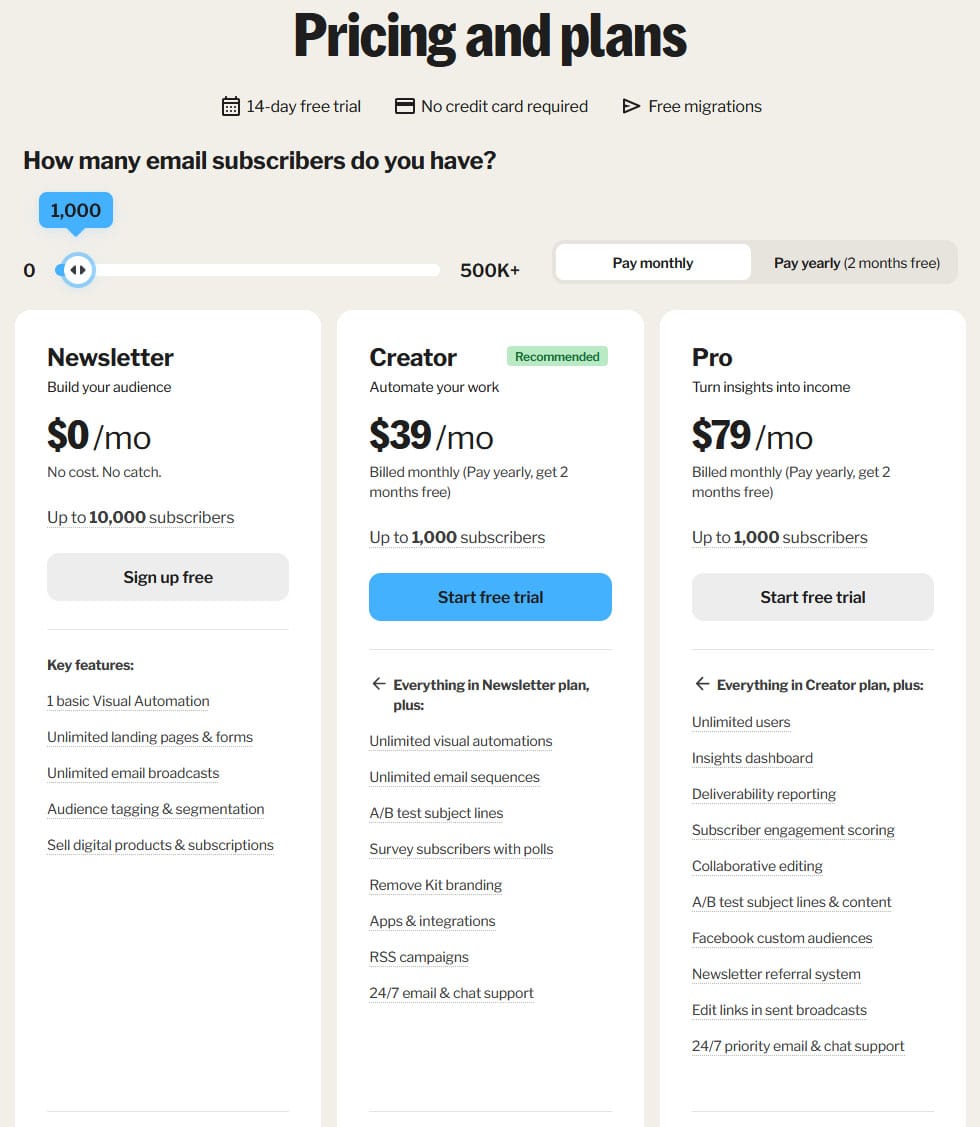 Kit Pricing in 2026 (for 1,000 subscribers)
Probably Kit’s best feature is the automations you can apply in directing people through your emails, depending on the actions they take or don’t take.
Other autoresponders do provide automations but Kit makes visualizing them much easier.
Kit also runs a free-to-join affiliate program that pays a recurring 30% commission for up to 24 months for every customer you send their way – join their affiliate program here.
4. GetResponse
This service has been around for a couple of decades now and is very popular with affiliate marketers.
People who use it claim that the deliver-ability rates for emails are better than Aweber (below) but, since I don’t have an account here, I can’t provide an opinion.
It is equally as popular as Aweber, however.
The squeeze pages it can create look better than the ones in Aweber.
The Marketing Automation tool allows you to configure how subscribers are moved between your email lists as they take different actions (opening emails, clicking links, etc).
This is their current pricing plan – all prices shown are for 1,000 subscribers and prices for all plans will increase, the more subscribers you add.
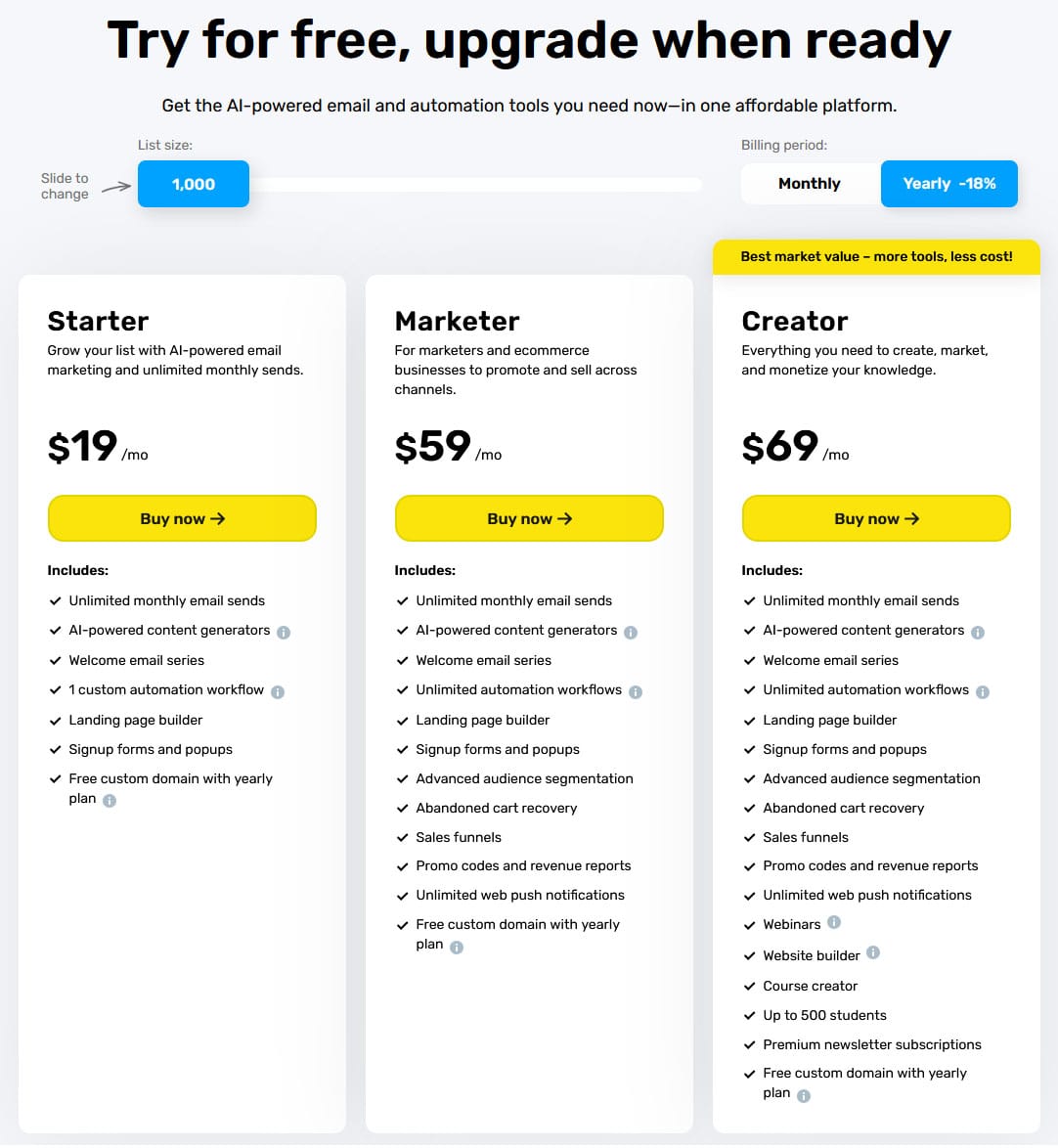 GetResponse Pricing in 2026 (for 1,000 subscribers)
Since I originally wrote this post, GetResponse have changed their pricing structure and plans and they no longer offer their Free Forever Plan but you can test-drive their platform free for 14 days.
Note that their prices are geo-locked which means you’ll be charged in your local currency if you’re outside the USA.
Prices may also include local taxes that are not levied in the USA.
The image below shows the plans and prices that were in effect a couple of years ago.
Note that for each plan, the minimum number of subscribers for that plan is listed.
Now all plans can have a minimum of up to 1,000 subscribers.
However, the price of the plans, as well as their names and features have changed in many cases.
Their current most popular plan – the Marketer Plan – costs $59/mth for up to 1,000 subscribers whereas the older Pro Plan used to cost $49/mth for up to 5,000 subscribers.
You can save 18% on fees if you subscribe annually rather than monthly.
The older Enterprise plan has been removed.
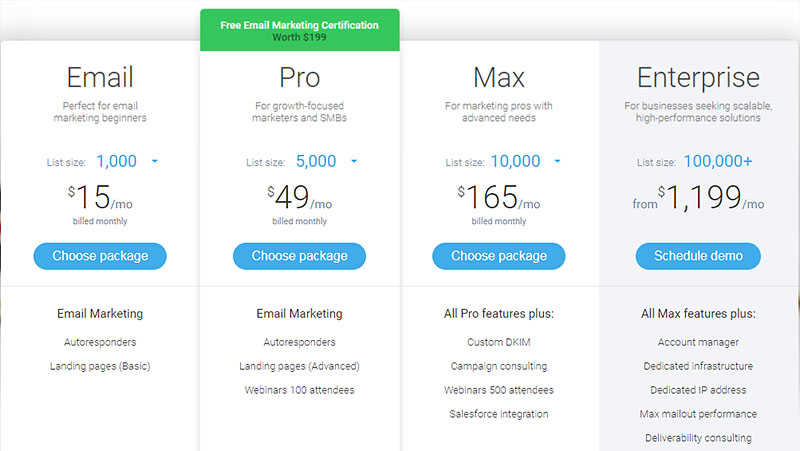 GetResponse’s old pricing structure and Plans
Getresponse also provide support for integrating webinars into your email campaigns, something Aweber doesn’t provide.
They also don’t enforce double-optins the way Aweber do.
For that reason, this service is more popular with internet and affiliate marketers.
5. MailerLite
Another popular but less well-known autoresponder.
They do advertise a free plan for new marketers but it’s really just a 14-day Free Trial with less advanced features.
With the “free” plan you can build a list of up to 500 subscribers (it used to be 1,000) and send out up to 12,000 emails each month for free.
MailerLite was built with affiliate marketers in mind so for that reason it’s a better choice than MailChimp, for example.
They’re also cheaper than MailChimp as you scale up your subscriber numbers.
These are the pricing options for the different plans, depending on if you want to pay monthly or yearly (their pricing hasn’t changed):
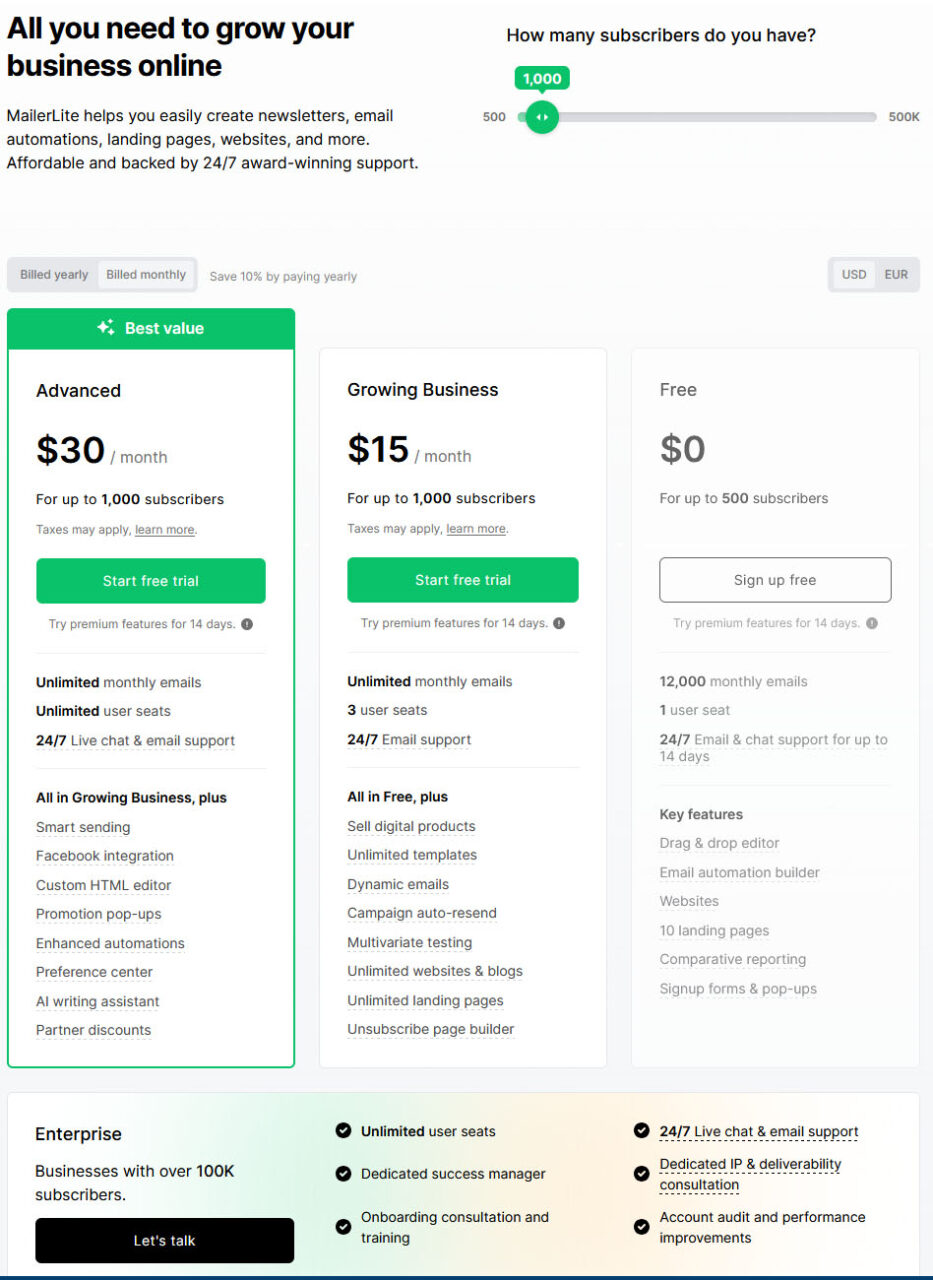 MailerLite Pricing in 2026 for 1,000 subscribers
You can build a variety of landing pages with MailerLite and there’s no limit to the number of landing pages you can build.
There’s also no limit on the number of emails you can send out each month.
6. AWEBER
This is one of the grand-daddies of email services providers.
They’ve been around for almost three decades and have a rock-solid reputation.
They used to be my preferred standalone autoresponder service… but not any more.
The reason is that they put up their prices by 50% and removed the ability to send an unlimited number of emails.
Now you’re restricted to being able to send out a number of emails that totals 12x your number of subscribers.
That’s basically restricting you to sending out 12 emails to your full subscriber list per month.
That was a non-runner for me which is why I switched to Systeme.io and migrated my email list over to them.
You can try out the service free for 14 days (it used to be 30 days).
Aweber used to offer a free account where you could collect up to 500 subscribers but they’ve removed that option now.
The pricing below is for 1,000 subscribers so you can compare it to other services.
Aweber do offer a lower price of $30/mth for up to 500 subscribers.
Note that as the number of subscribers you collect increases, so will the fees though you can save up to 33% if you pay annually rather than monthly.
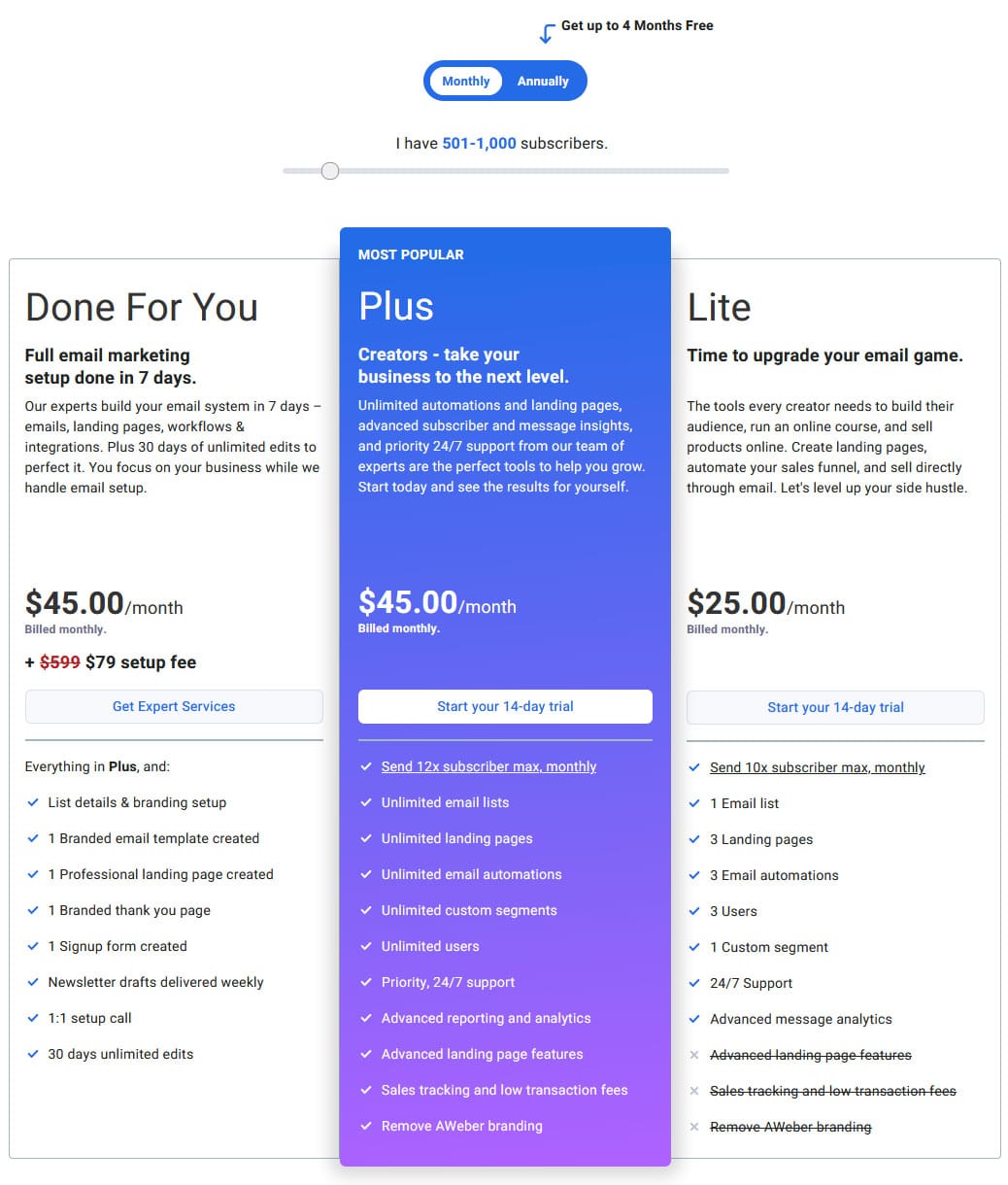 Aweber Pricing in 2026 for 1,000 subscribers
Aweber do have a policy of enforcing double-optins – that’s where the service sends a potential subscriber a “click here to confirm you want to join this list” type of email.
So to get a subscriber, they have to fill out your squeeze page and then click a link in an email they’ll be sent.
Needless to say, due to this extra step, subscription rates are lower.
You can disable the double-optin setting for your lists in the Aweber dashboard.
But, even if you do that, and your autoresponder is integrated with a 3rd-party service (like landing page software), Aweber will still enforce the double-optin option.
You can get this enforcement disabled for your list if you contact Aweber support and give them a good reason.
I was never turned down when making such a request (when I had an account with them).
If you have a list that’s dead or dying, Aweber have a good tutorial video here on how to re-engage a dead or dying email list.
Honestly, as a marketer I can no longer recommend Aweber as an autoresponder service.
The limitation on the number of emails you can send is what kills the service.
That and the price.
There are much more cost-effective and unlimited services available.
7. MailChimp
This autoresponder is another popular one.
It too used to offer a free plan where you could collect up to 500 subscribers but now it’s just a 154-day free trial.
If you’re interested in trying out the more advanced features in the higher tier plans, you might as well use their 14-day trials instead.
One important thing to note is that MailChimp does not like people building lists in the make money online (MMO) niche.
They have been known to shut down lists without notice if they discover you’re in that niche.
For that reason, I don’t recommend MailChimp as an autoresponder.
Here’s MailChimp’s current fee structure for a minimum of 500 to 1,500 contacts (these are only the starting prices so prices will rise the more contacts you get in each plan):
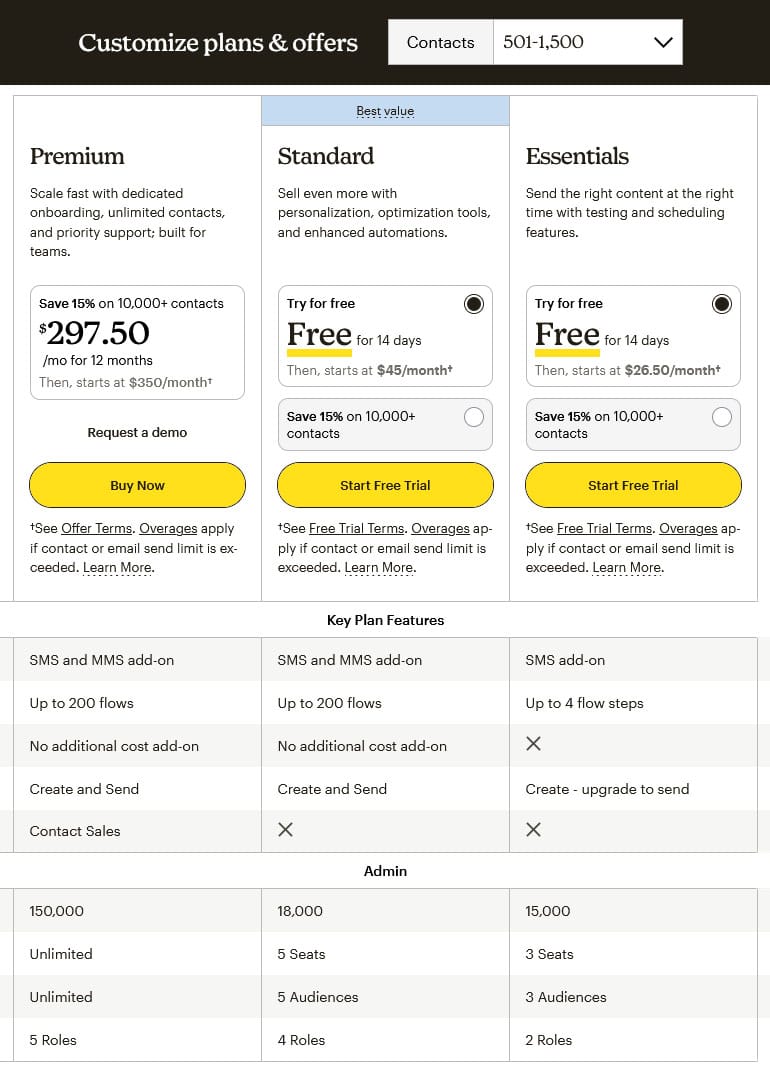
The first line in the “Admin” section above is the number of emails you can send per month.
This number is 10X the maximum number of subscribers you can have in your plan (for the Essentials Plan).
So, with a 1,500 max. subscriber plan, you can send up to 15,000 emails per month.
With a 2,500 max. subscriber plan, you can send up to 25,000 emails per month.
This makes it less capable for marketers (10X max. subscriber count) than Aweber (12X max. subscriber count).
Not a good position to be in if you want to send emails every day.
Of course, each time you increase the number of subscribers you want to collect, your monthly fee will increase accordingly.
The next level up is the Standard Plan where you’re allowed to send out 12X your max. subscriber number (so for a 500-1,500 subscriber plan, you could send out 18,000 emails per month).
If you want to be able to send out emails to your contacts every day, or even more than one a day, then MailChimp simply is not the autoresponder service for you.
Here’s the breakdown of what the Essentials Plan would cost you:
| # Contacts | Essentials Plan Price Per Month | Standard Plan Price Per Month | ||
| Up to 500 | $13.00 | $20.00 | ||
| Up to 1,500 | $26.50 | $45.00 | ||
| Up to 2,500 | $45.00 | $60.00 | ||
| Up to 5,000 | $75.00 | $100.00 | ||
| Up to 10,000 | $110.00 | $135.00 | ||
| Up to 15,000 | $180.00 | $230.00 | ||
| Up to 20,000 | $230.00 | $285.00 | ||
| Up to 25,000 | $270.00 | $310.00 | ||
| Up to 30,000 | $300.00 | $340.00 | ||
| Up to 40,000 | $340.00 | $410.00 | ||
| Up to 50,000 | $385.00 | $450.00 | ||
| Up to 75,000 | not available | $630.00 | ||
| Up to 100,000 | not available | $800.00 | ||
| Monthly send limit is 10x contacts for Essentials, 12x for Standard. | ||||
So, as you can see, while MailChimp may be a great service to get started with (if you’re not in the Make Money Online niche), the price escalates rapidly the more subscribers you have.
Note: MailChimp does not like lists in the Make Money Online niche. I found this out the hard way when I was building an internet marketing list and MailChimp closed down my list without notice. If that’s your niche, you’re better off going with a different service.
Summary
For $0 per month, the Free Plan Systeme offers lets you collect up to 2,000 subscribers and send out an unlimited number of emails.
The Startup Plan is just $17 per month and raises your subscriber limit to 5,000.
For $97 per month, their Unlimited Plan lets you collect an unlimited number of subscribers and send an unlimited number of emails.
This makes it the best option for marketers as you get the best bang for your buck and you can step up from the Free Plan to the Unlimited Plan as and when you need to.
SendShark is the next best option since you can collect up to 20,000 subscribers for $25 per month and send out unlimited emails.
While Kit and GetResponse are built for marketers, you have to plan on paying higher and higher fees the more subscribers you collect.
MailerLite is certainly an option as it has the low fees but you will still need to pay more as your subscriber number grows.
Both Aweber and MailChimp are not worth considering given their higher pricing and that they limit the number of emails you can send each month.
Personally, I chose Systeme as my autoresponder because of its fantastic Free Plan, it’s low-cost when you need to upgrade, its Unlimited Plan, I can send as many emails as I want each month and because I can also build sales pages, funnels, blogs and courses with it too!
I do also have a SendShark account but I use it less frequently than I use Systeme.
I had an Aweber account for 20 years but I cancelled it because of the 50% price hike and the limitations on email sends that were introduced.
As I mentioned earlier, I switched over to using Systeme.
How To Create a Squeeze Page
As I mentioned above, you can create a squeeze page, albeit a simple/basic one, directly in your autoresponder service.
But for extra oomph and a bolder, more attention-grabbing optin page, use a dedicated landing page builder.
These are the more popular tools:
1. Systeme

As I mentioned above in the Autoresponder Mini Reviews section, Systeme.io is an all-in-one marketing platform that provides a sales funnel builder, a course/membership site builder, a blog/website builder and an integrated autoresponder.
There are some additional tools too.
It also offers a completely free-for-life plan that allows you to get started with list building and email marketing without having to worry about any expenses as you find your feet.
It’s a well specified Free Plan as well, and lets you to collect up to 2,000 subscribers, create one list, one email campaign and send out an unlimited number of emails.
You can also create up to 3 sales funnels, 1 course and 1 community.
I went into more depth into what Systeme offers in this blog post so I won’t reiterate that here.
When you feel you’re about to or need to exceed these limits, their paid plans are ridiculously inexpensive.
And, if you pay annually, you save an additional 30% on those fees.
You’ll need to check the Systeme Pricing page to see all the included features. You get 2 months free if you pay annually
If you compare what Systeme offers to Clickfunnels or Groove, you’ll see that it provides far better value than either of those platforms.
Clickfunnels and Groove are really aimed at businesses rather than solopreneurs and the typical affiliate marketer, whereas Systeme provides the tools you need at very competitive prices.
I’m moved my sales funnels from Clickfunnels over to Systeme so I could save on Clickfunnels’ fees.
With the release of Clickfunnels 2.0 a couple of years ago, their fees went up by 50%, at least for their Basic Plan.
They finally saw the error of their ways and reduced the Basic Plan fee back to $97/mth.
People like me who joined Clickfunnels 1.0 back in the day were not automatically upgraded to Version 2.
We could still use Version 1 but we had to pay the extra 50% if we wanted access to Version 2 which, for example, includes their new drag-and-drop builder, something Systeme has had for ages.
Not really a nice way to treat your customers.
So, right now, Systeme is my #1 recommendation (check out my bonuses too).
The down side of me doing this migration over to Systeme was that I had to totally rebuild my funnels in Systeme – there was no way (at least that I know of) to simply move sales funnels between different platforms.
2. Clickfunnels 2.0

When I first wrote this article, I was a Clickfunnels 1.0 member.
Clickfunnels 2.0 was released a couple of years ago and the original Clickfunnels was renamed Clickfunnels 1.0 or Clickfunnels Classic.
Unfortunately for Clickfunnels 1.0 users, we were not automatically upgraded to Clickfunnels 2.0.
While we could still use Clickfunnels 1.0, we were expected to pay 50% more to be upgraded to the latest version.
That put Clickfunnels 2.0 outside the budget of many affiliate marketers and was, I think, a bad faith decision made my Clickfunnels.
Clickfunnels 1.0 is no longer available to new customers; Clickfunnels 2.0 is the only game in town for them.
That said, Clickfunnels is the biggest and the one of the best squeeze page and sales funnel builders and does so much more than building a simple squeeze page.
It builds entire sales funnels.
You can try it out free for 14 days.
With this tool alone, you can build a profitable online business.
You won’t need to pay for web hosting, an autoresponder, a webmaster or any of the array of tools and services you normally need to run an online business…
…though you will have to choose the Scale or Optimize level memberships to access some of the advanced features.
Building and editing your various pages – squeeze pages, sales pages, upsell/OTO pages, order pages, thank-you pages etc. is a simple exercise with all the back-end techie stuff hidden from you.
It also integrates with Ontraport and Infusionsoft, which don’t provide the most customer-friendly order pages, to let you create great-looking order pages yourself.
Clickfunnels also has its own Order Cart so you don’t have to use a third-party payment processor like PayPal, Infusionsoft or Ontraport.
It will even let you create membership sites (also known as courses).
Clickfunnels 2.0, which was released in October 2022, includes a modern drag ‘n’ drop page/funnel builder and an upgraded user interface.
The limit on the number of funnels and pages you can build is now finally gone.
The Clickfunnels 1.0 Basic Plan did not include an autoresponder so you had to pay for an external one like Aweber, GetResponse, Kit, etc. separately.
Clickfunnels 2.0’s Launch Plan now includes an integrated autoresponder.
The Basic Clickfunnels 1.0 plan used to cost $97 per month but a Clickfunnels 2.0 Basic Plan cost $147 per month.
As I mentioned, Clickfunnels reduced the fee back to $97/mth, removed the page and funnel build limit, added an autoresponder and renamed the plan as the Launch Plan.
On the other hand, The Pro plan used to cost $297 per month but now that’s been reduced to $197 per month and renamed as the Scale Plan.
A new Optimize Plan was added at the $297/mth price point.
Both the Launch and Scale Plans do impose limits on the number of emails you can send, so that’s something to take into consideration.
The Launch Plan lets you collect up to 10,000 subscribers but send, at most, 50,000 emails per month (that’s just 5X your max number of subscribers).
The Scale Plan is both better and worse in this regard – collect up to 75,000 subscribers and send a max of 300,000 emails per month (that’s a lower 4X your max. subscribers!).
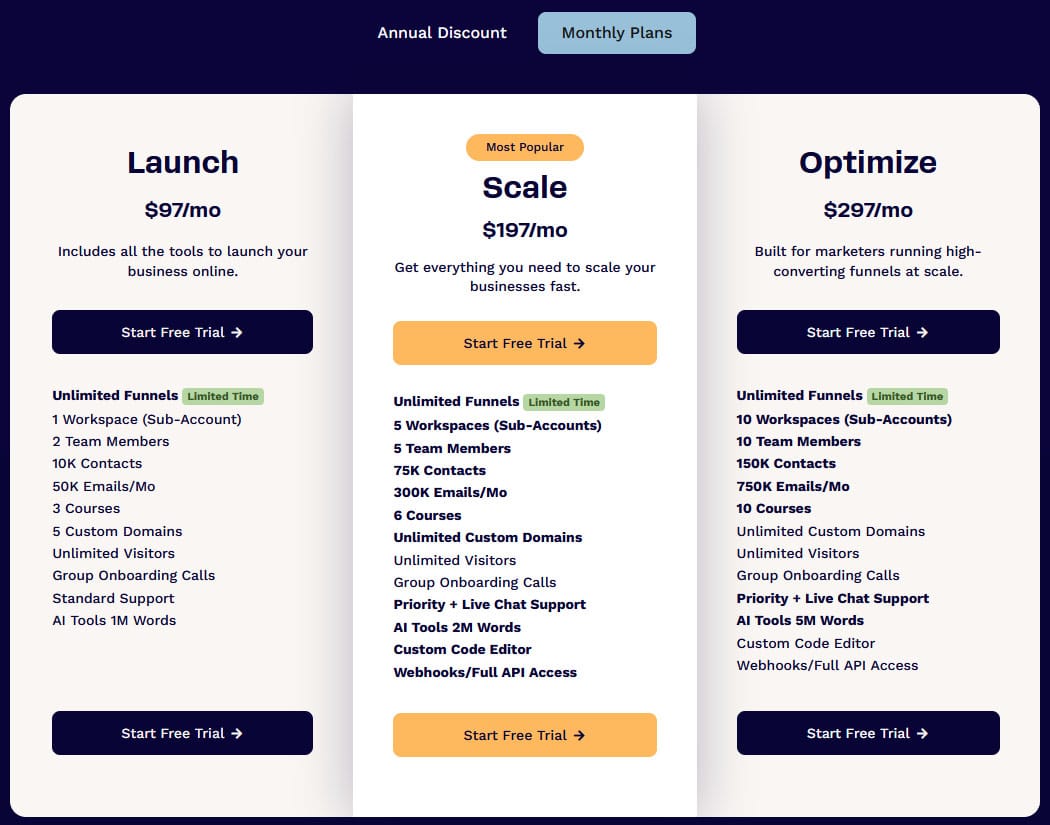 Clickfunnels 2.0 pricing. You can save 13%-30% on fees if you pay annually
Classic Clickfunnels (Clickfunnels 1.0) – what the original service has been rebranded as – is no longer available to new subscribers.
Existing Classic Clickfunnels members can still use and access that platform at the original pricing though.
There is a third Plan available called the Optimize Plan which is currently on offer for $297/mth (or $208/mth equivalent if you pay annually).
The training to go along with Clickfunnels 2.0 is also included in the three plans.
- As an aside, if you’re an affiliate marketer, Clickfunnels provide a free affiliate bootcamp course here. If you want to become their affiliate but want to skip their course, sign up as an affiliate here.
- Download their free Funnel Hackers Cookbook which contains 22 successful sales funnels.
- Get Russell Brunson’s free Expert Secrets book (just pay shipping) – it’s one of the best books every marketer should read.
- Check out Russell Brunson’s Secrets of Success program and become an affiliate (free).
3. Groove

Back in the early 2020s this was essentially the new kid on the block where building sales funnels was concerned.
It offers similar, if not even more features than Clickfunnels.
You can actually create a free-for-life account at GrooveFunnels:
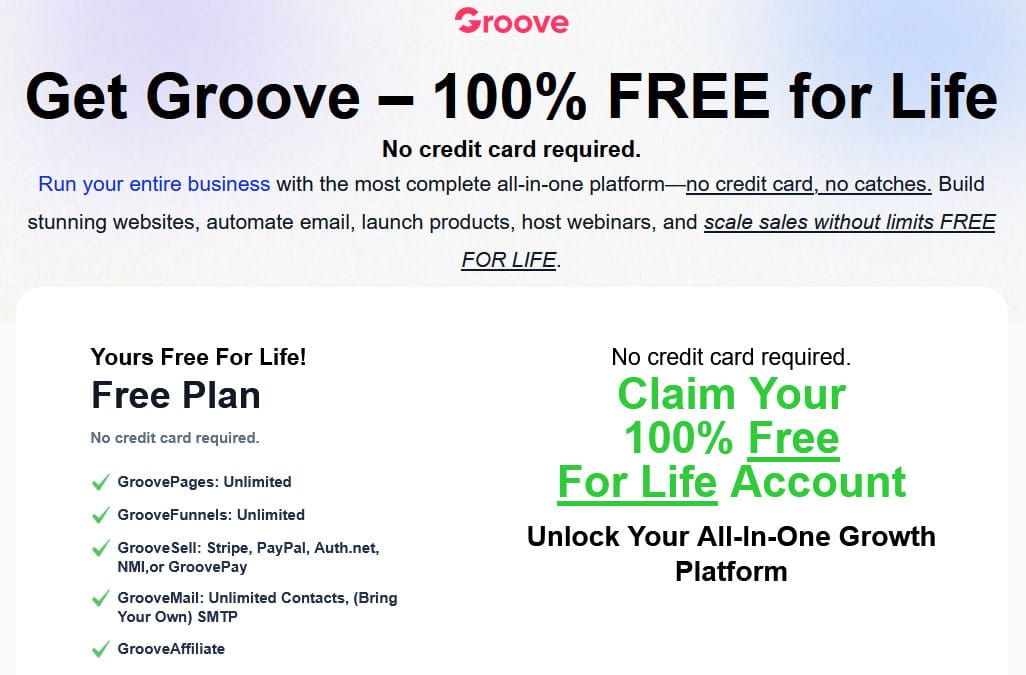
When Groove first launched (as GroovePages), it’s price was $497 for lifetime access.
As more tools were added, the price rose to $1,397 for lifetime access.
Then lifetime access went away and $99/mth pricing was introduced.
The Lifetime Access was reintroduced through a backdoor page for $2,997… and you got bonuses too.
For that fee you got Lifetime Access to all features of the service, present and future, free upgrades and Unlimited everything.
Now that the entire suite is free for life, I can only suppose that those who paid for it are pretty unhappy (unless they were refunded their payments).
I don’t know the story behind why Groove is now free (it was created by Mike Filsaime).
I did subscribe to another online product Filsaime released in the 2010s and that product disappeared overnight.
No warning, no explanation.
One day there. The next day a 404 site error.
So I’ve treated products attached to him with some suspicion ever since.
Groove may be free now and if you build a business using its tools, you may find one day that the entire platform is gone, and your business with it.
Or maybe Groove will stay online for years to come.
Given my personal experience with Filsaime, I don’t trust that it won’t be unceremoniously pulled one day.
I took a closer look at GroovePages and its features in this post.
And there’s a comparison between Clickfunnels and Groovepages here which should help you decide which of the two tools is best for you.
4. ConversioBot

This is a departure from building standard landing pages with optin forms.
Instead, you create AI chatbots that can be added to your posts, pages or websites to interact and engage with your visitors in order to get them to sign up for a free gift and join your email list.
You can also create full-page chatbots on their own custom domains so the chatbot is the only thing on the page and there are no other distractions.
The idea is to direct your visitors to certain products, based on the questions they are asked by the chatbot and, along the way, you can give them a free gift if you want and collect their email address.
With people engaging with the chatbot, they’re more likely to follow through on giving you their email address and using them is a novel way to build an email list.
You can see a full-page AI chatbot I’ve built here with ConversioBot.
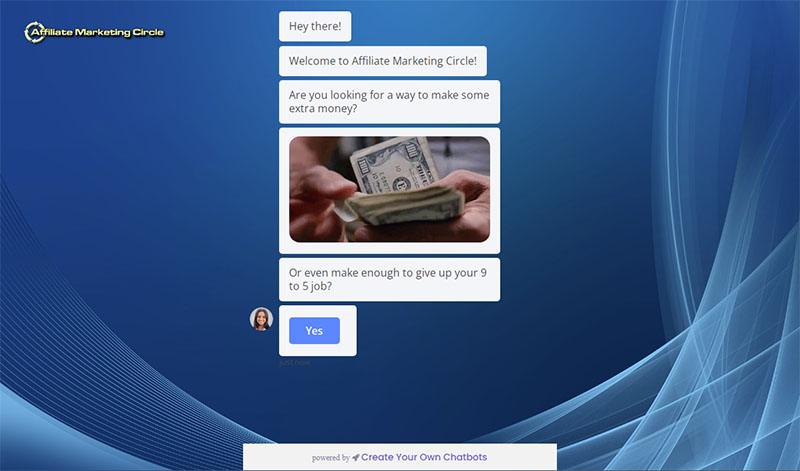
ConversioBot normally costs $47/mth (check it out here) – or $35/mth for the Lite version.
If you want to learn more about ConversioBot and how I built my first AI chatbot with it, check out these two posts:
5. Elementor Pro
There is a free version of this WordPress plugin with a cut-down feature set that lets you build basic landing pages for your offers.
It’s a good way to gain experience building pages and 5 free page templates are provided with the plugin.
However, Elementor Pro – the commercial version of the plugin – provides over 50 widgets you can add to your landing pages (posts, galleries, price tables, countdowns, Facebook widgets and so on).
Elementor also allows you to create popups – they may be annoying, but they do work.
And the Pro plugin also comes with a over 300 page and popup templates.
The plugin has become one of the most popular landing page builder options for WordPress and has over 3 million users.
These are the pricing options:
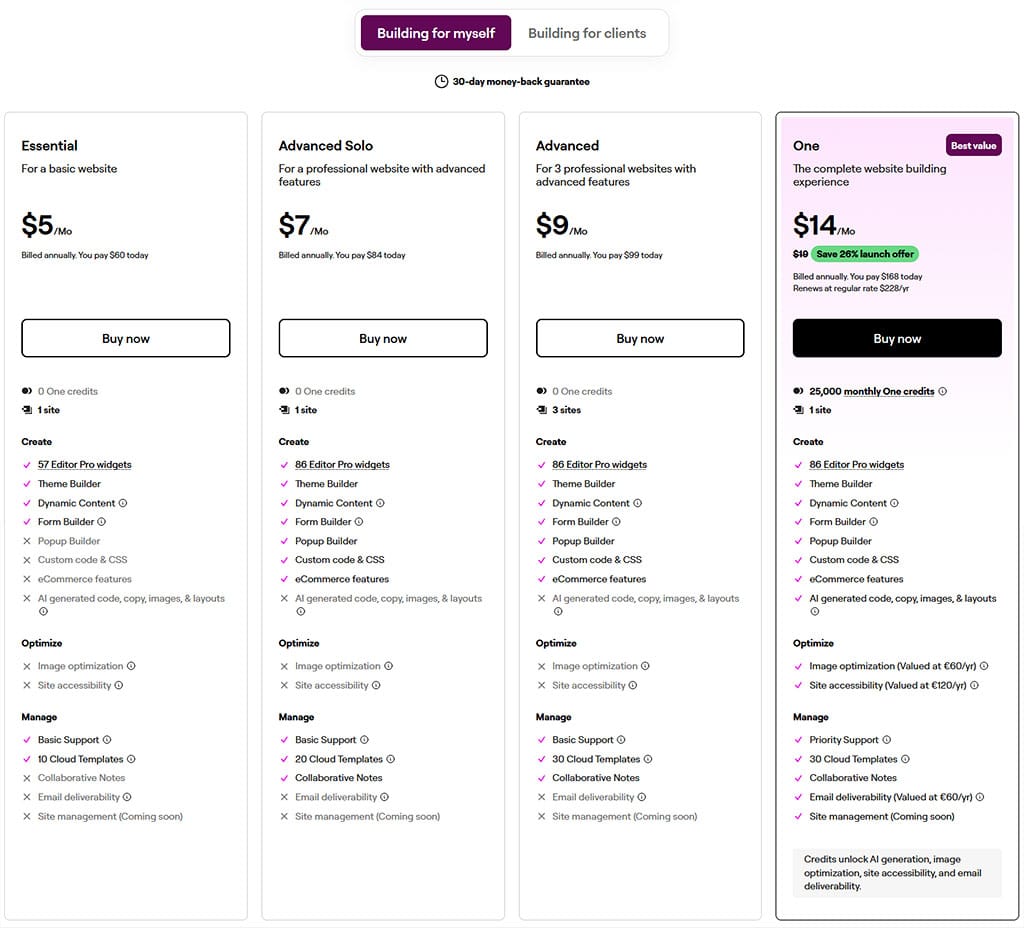 Elementor Pro Pricing in 2026
If you’re an affiliate marketer, Elementor runs its own affiliate program that pays up to 50% commissions on fees – you can join their affiliate program for free here.
6. Landingi

If all you’re looking for is a landing/squeeze page builder, then that’s something Landingi excels at.
You can build an unlimited number of landing pages quickly and easily.
There are over 400 landing page and pop-up templates already in the system to get you started and you can customize them as you need or create pages from scratch.
All the popular autoresponder services are supported so you can hook up your landing pages to whatever autoresponder you like.
They also provide a free course on how to create landing pages.
There are four pricing plans (if you pay annually, you get 2 months free):
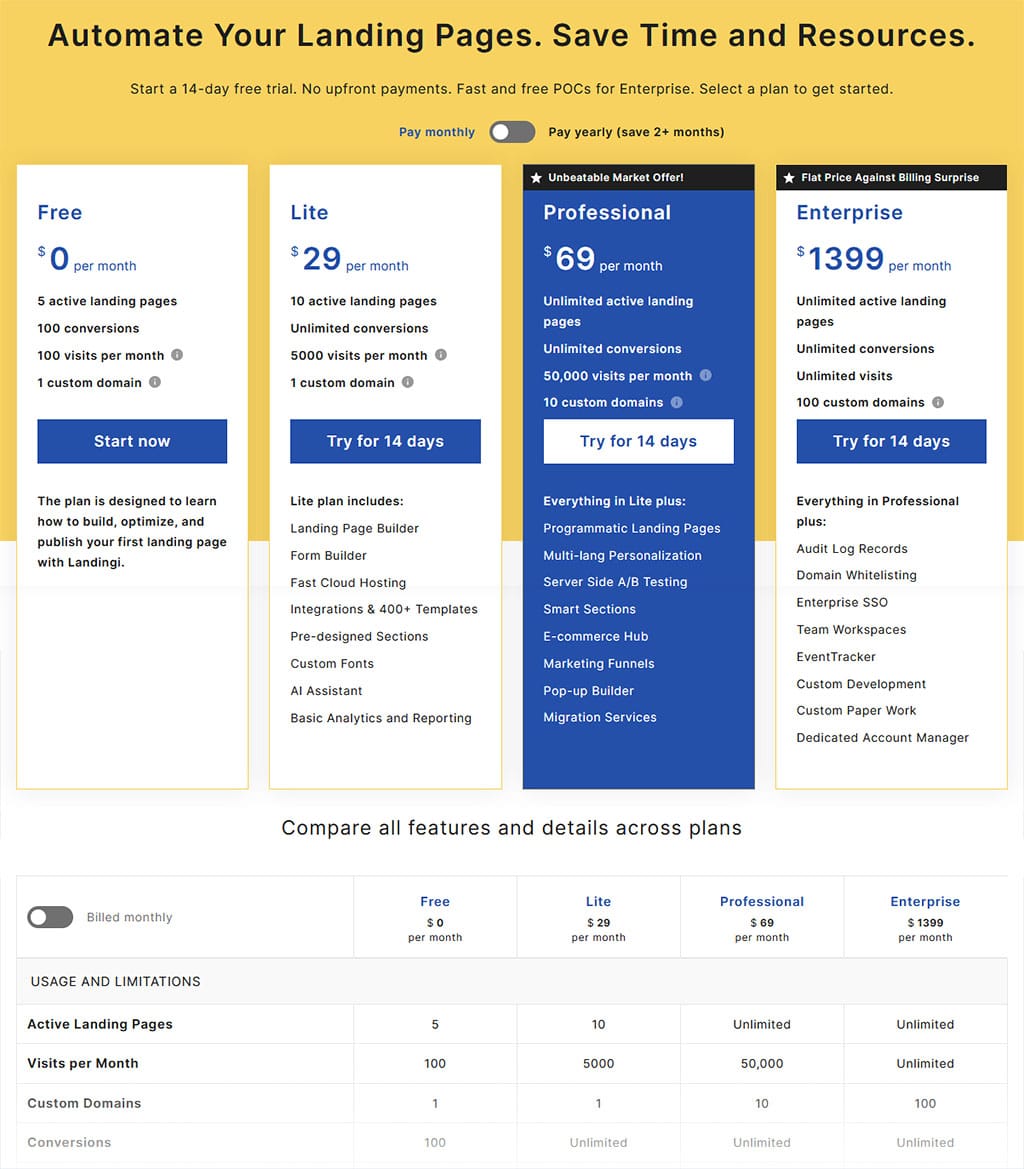 Landingi Pricing in 2026
- Free – Allows to learn how to build a landing page at no cost.
- Lite – $29 per month or $24 per month if you pay annually (a 17% saving). This is for those starting out.
- Professional – $69 per month or $57 per month if you pay annually (a 17% saving). This is for business owners and smaller companies to build high-converting campaigns that increase sales.
- Enterprise – $1399 per month or $1150 per month if you pay annually (a 18% saving). This one’s for agencies, integrators, and resellers to launch offers and scale customer service.
All plans have a 14-day free trial.
7. LeadPages

LeadPages is more than just a landing page builder.
It is the only platform that lets you collect leads from landing pages, pop-up forms, social media, text messaging, and email without requiring an external autoresponder.
It includes a Facebook Ad builder, a built-in payments system that can be added to any landing page or popups.
All pages and forms built with it are fully mobile responsive, so important these days.
You can even split test pages and popups to see which ones are getting the best response from your traffic.
The squeeze pages they provide, out-of-the-box, have already been extensively tested to convert.
LeadPages is really for established marketers.
There are several plans with their Standard Plan coming in at $49/mth.
If you’d prefer to pay annually, it will cost $444 per year (equivalent to paying $37 per month – a 25% saving).
There are other plans as well:
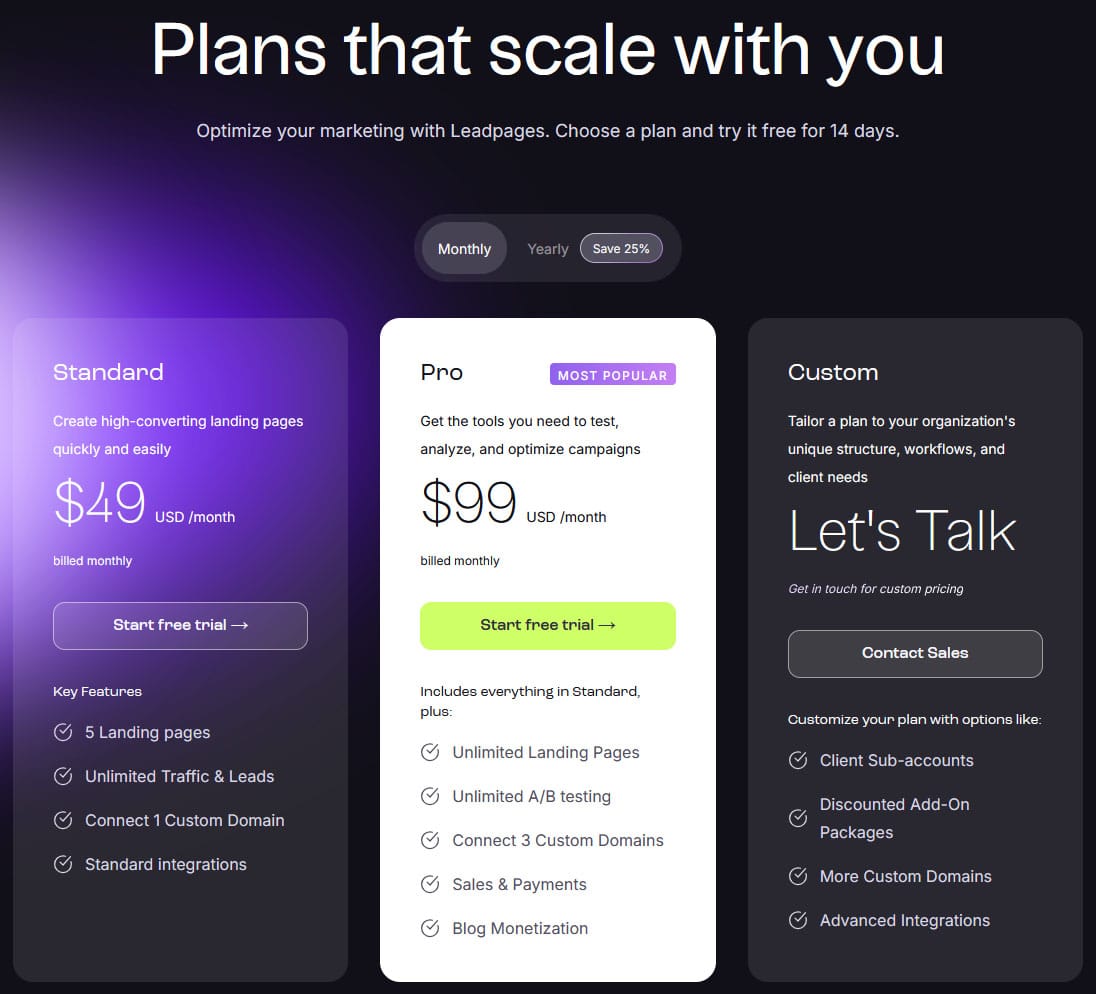 LeadPages Pricing in 2026
- Pro – $99/mth or the equivalent of $74/mth if you pay annually, saving $300 per year
- Custom – price depends on what exactly you’re looking for so it will be different for everyone
The Pro plan is equivalent in price to a Clickfunnels Launch plan or a Systeme Unlimited plan.
But Lead Pages is more of a page/site builder than a funnel builder.
However, take advantage of the LeadPages free trial that lets you test the system out for 14 days.
Then you’ll know if this is a service you want to buy or one you want to aspire to in the future.
- LeadPages provide a free email marketing webinar here
- Attend the free Webclass where they show how to structure and build a website
- Take a tour of LeadPages and get an inside look
- LeadPages’ Free Guide To Landing Pages
8. OptimizePress 3
The latest version is OptimizePress 3.0, which includes the OptimizeBuilder, SmartTheme, and specialized plugins like OptimizeFunnels.
It has been completely rebuilt to bring it in line with today’s online technologies.
OptimizePress is one of the best WordPress plugins for creating conversion-optimized landing pages, sales pages, blogs and membership sites.
So it’s more than just another plugin for building squeeze pages.
It also comes with the SmartTheme theme for WordPress so you can build a blog that not only looks beautiful and is blazing fast, but is designed with conversions in mind.
Create 2-step opt-in forms to help increase conversions on landing pages.
Track which pages are working and optimize your campaigns for success.
The plugin uses drag-and-drop technology to make building pages and forms as easy as possible.
There are over 300 page templates included and all are optimized for mobile as well as desktop.
There’s also a huge library of page elements (such as price comparison tables, social media boxes, etc) to choose from.
If you’re looking for free reports and ebooks to give away to entice people to subscribe to your mailing lists, check out my Lead Magnets And Bonuses – Where Can You Get Them To Help Build Your Email List? post.
These are the OptimizePress pricing options:
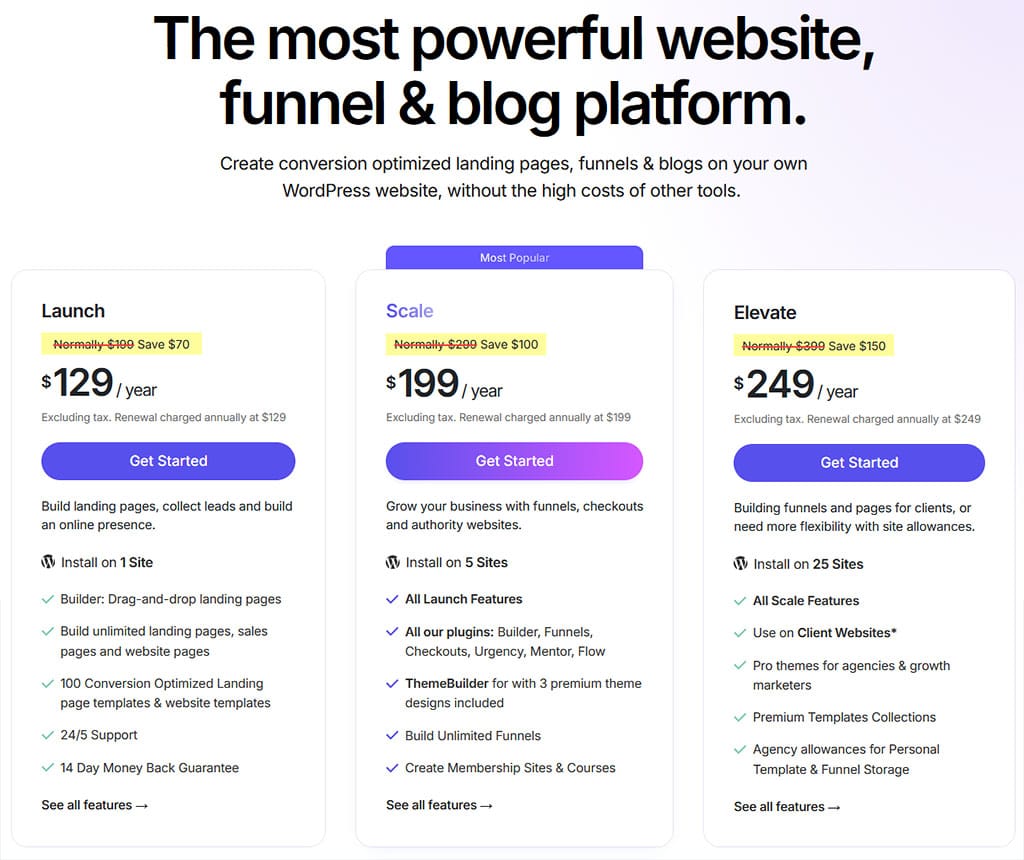 OptimizePress Pricing in 2026
Pricing structure has changed somewhat since 2024 when the plans on offer were:
- an Essential license is for 1 site for $99 per year
- a Business license for 5 sites which also has additional features for $199 per year
- and the Agency plan for $399 per year which gave a 20-sites-for-clients license and ALL available features.
9. PageDyno
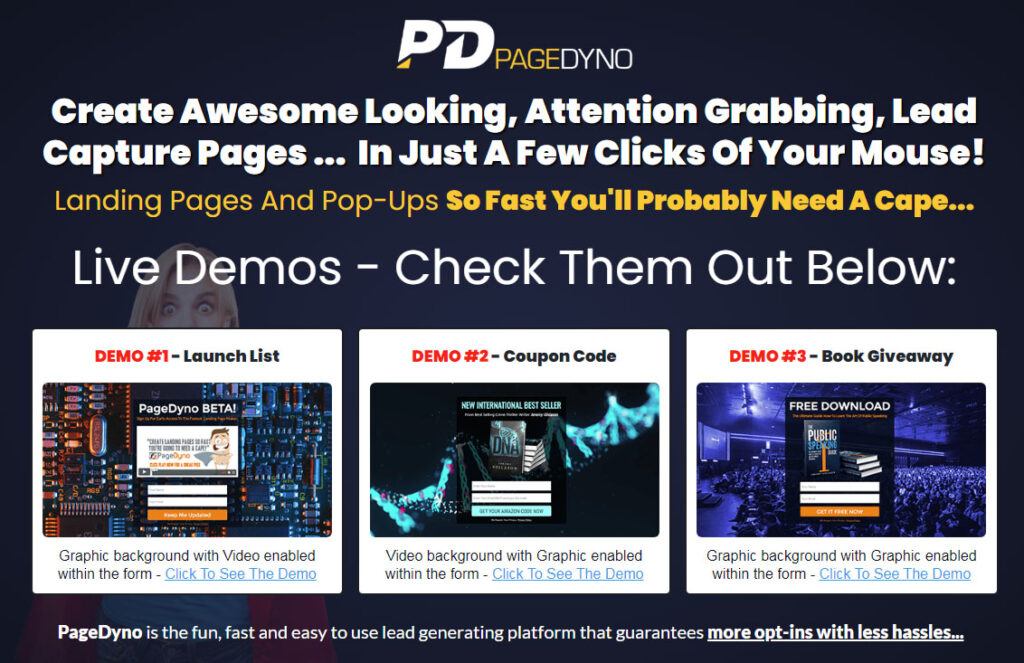
PageDyno is the newest page builder app from the folks behind Genius Lander and Landing Page Monkey and really replaces those page builders.
It’s another step-up from Genius Lander.
PageDyno lets you easily create multi-step pages and, depending on your campaign, using a multi-step, opt-in can lead to higher conversion rates.
Instead of immediately asking for the opt-in, use a ‘Step 1’ page to ask a question or demonstrate something before visitors are shown the opt-in form.
With PageDyno, running a multi-step opt-in is a fast way to fine tune your audience targeting and segmentation.
You can also turn your pages into ‘Pop-Ups’.
Embed your opt-in boxes (including multi-step boxes) into your web pages directly using a simple, copy/paste code snippet.
You can also configure the pop-ups to ‘LOCK’ the page below it so visitors have to hand over their email address to unlock the page to see the content on it.
Finally, you can set triggers that govern when the pop-ups will appear on your pages.
PageDyno costs $69.99/year.
10. Landing Page Monkey [this has now been retired]

If you wanted a landing page builder that was affordable but did not need WordPress to work, this was one to look at.
This web-based tool (which I reviewed here) made it incredibly easy to create highly effective and dynamic landing pages that converted well, because they added all sorts of features that grabbed attention and encouraged user participation.
Best of all, the web-based interface allowed you to dive in and create your own pages with absolutely no design or programming experience whatsoever.
If you could use email and sites like Facebook, you could have used this software!
It cost a one-time $37 and if you decided to buy through the above link (now removed), you got all the bonuses listed on that page as well!
Adding a video background to an opt-in form was as easy as pasting in the video’s link.
You could use static background images as well.
The software integrated with all the popular autoresponder services.
All your landing pages were hosted for you and when you created a page, you were given a link to it that you could promote.
If you preferred to have the page appear like it was on your own domain, you could download a small file which you then uploaded to your web server.
This was the tool I used for creating my landing pages until I switched to Clickfunnels. and then later to Systeme (when Clickfunnels was too limiting)
I used to have some squeeze page examples below but since Landing Page Monkey is now defunct, those pages no longer work.
11. Genius Lander [this has now been retired]
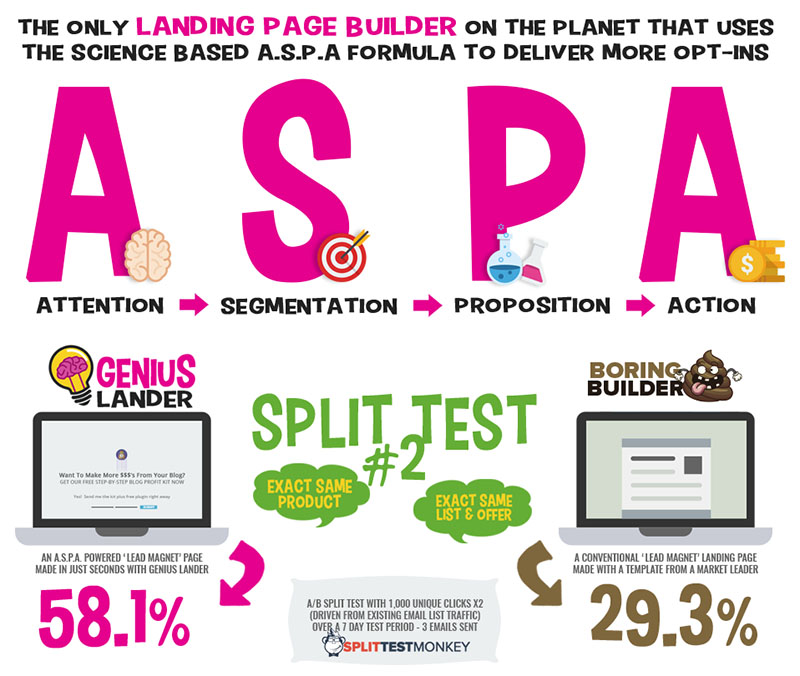
This landing page builder came from the same company that created Landing Page Monkey, but it too is now defunct.
You can think of it as a souped-up version of that app which offered additional features, including alternative ways of presenting the optin form to visitors.
Genius Lander’s ability to segment and target the perfect prospects for your business not only delivered better quality leads, but it laid the foundation to increased profits and more sales for you long term!
This online app was a single $99 payment.
12. Conversion Gorilla [no longer supported and now crashes]

Now this isn’t strictly a landing page creator.
Instead, it puts an attention bar at the top or bottom of the screen on your site.
You can advertise offers with (affiliate) links to them, add opt-in forms to collect subscribers or show a video, with an affiliate link for the related product.
If you upgrade to the PRO version, you can place an attention bar over any page on the internet!
That’s how to build an email list the fast way if you enjoy sharing links on social media.
This web-based software is a $49/year and you can create an unlimited number of attention bars with it.
Conversion Gorilla comes with additional bonuses if you decide to buy it through the above link. I reviewed it here a while back.
13. ProfitBuilder [No longer available]
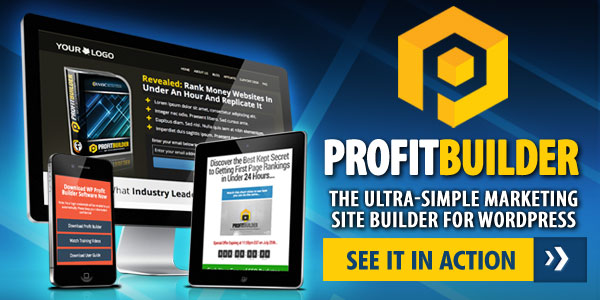
Another plugin for creating squeeze pages and landing pages in WordPress was ProfitBuilder.
If you already own the plugin, then it still works.
This created professional-quality optin-forms on your blog as well as opt-in overlays (nicer than popups).
It could build a ton of other types of marketing pages like sales pages and funnels, membership sites, social gates, portal pages, etc.
It was the most complete, all-in-one, WordPress landing pages plugin for online marketers at one time.
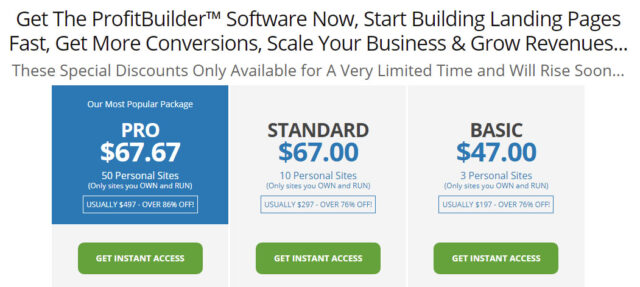
It was a one-time payment.
The plugin came with over 130 high-converting templates – you just added your own text and/or images.
You could build sales funnels and do split testing too.
14. InstaBuilder 2.0 [No longer available and no longer working]
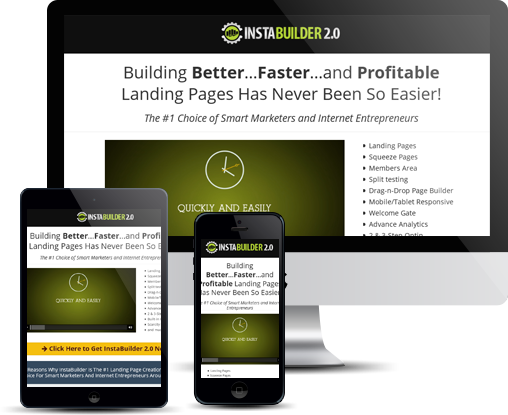
InstaBuilder was a WordPress plugin exclusively designed to create various types of squeeze page and funnels which work on both desktop PCs and mobile devices.
It came with over 100 pre-designed templates and you can create multi-step optin pages if you need to.
The squeeze page editor was a fully-featured editor in its own right allowing you full customization of your pages.
Integrating the optin code provided by your autoresponder was a simple copy-and-paste operation.
Background videos were supported too, though to have them work, you needed to enable the Mute Sound option.
That’s because the Chrome browser will no longer auto-play videos with sound.
There were 3 plans:
- a 3-site license for $77
- an unlimited site option for $97
- and a Developer Licence option which allows you to install it on an unlimited number of your own and client sites for $197.
InstaBuilder is no longer being maintained as its original developer died some years ago and the plugin no longer works.
These were a couple of basic squeeze page examples I created with InstaBuilder but none work any more so I’ve removed the links:
- The Big Giveaway – Get 12 Months of Membership Content With Full PLR Rights Included – FOR FREE!
- Get Step-By-Step Coaching…To Help You Create And Launch Your First (Or Next) Funnel, Totally From Scratch…In Just 30 Days!
- This Newbie-Friendly Software Grabs FREE Automated Traffic And Banks $233 Per Day On Autopilot
Final Thoughts
And, if the above isn’t complete enough for you, I look at 5 more low-cost page-builder and sales funnel software solutions here.
List building can seem a formidable task, especially for a newbie.
Today, building squeeze/landin/opt-in pages is a simple task as the above tools show you how to create them the easy way.
There’s a tool for every budget.
Using squeeze and landing page software gives you much greater flexibility with the kinds of squeeze and optin pages you can create and, in some cases, full sales funnels as well.
And with all the current tools, you don’t even have to host your landing pages yourself.
People prefer squeeze pages with video backgrounds.
They tend to get a 40% better response rate than pages with a static background.
So choose a tool that can create that type of squeeze page.
If you want to put optin popups on your websites, then use PageDyno, although Clickfunnels does also provide a WordPress plugin to put the pages you build with it on your existing blog.
You don’t need animated backgrounds on that type of form.
My recommendation would be to start out with a free Systeme account as it gives you all the tools you need to get started with list building and email marketing.
You can think about buying one of the better-featured landing page builder software apps at a later stage or simply upgrade to one of Systeme’s paid plans.
Don’t forget that with some of the page builders above, you will need a separate autoresponder service on the other side of your squeeze pages to store your subscribers’ information and to be able to email your subscribers regularly (Systeme includes an autoresponder, even on their free plan, another reason to use it).
I’d appreciate any feedback you have on how to create squeeze pages and any suggestions for tools you’ve come across that you think I should include in the above list. Just sound off in the comments…

All the best,
Gary Nugent
P.S.: Don't forget, if you want to create an internet income of your own, here's one of my recommended ways to do that:


I love that there is so much information on the different companies that offer these services. I wasn’t aware of what a squeeze page consisted of so thank you for teaching me something new. I definitely will be incorporating something like this on my sites.
List building / email marketing was a side of online business that I ignored for far too long, Viviana. It always seemed like a huge amount of work was involved. Truth is, it’s not that onerous a task. And the rewards are certainly worth the effort! 🙂
I had only heard of a few of these services before reading your post. As someone new to the world of online marketing I really appreciate this easy to understand article. I also didn’t know how to use these but your article makes this much more clear.
All the services and tools have tutorial videos that show you how to use them, Rifhat.Q. But there is a bit of a learning curve with some of the services, especially the autoresponders. But it#s a learning curve that pays off. 🙂
Hi Gary, As someone really new to Wealthy Affiliate I found this article very interesting. Will need to read it again and really absorb all the wisdom and advice. Thank you. Kind regards, Jill
Thanks, Jill. I’ll be adding additional articles and reviews of many of these products and services in the future.
Great info, Gary!
Glad to be of help, Lori!
Thank you for this information Gary! I did not know all of this was available. I’ve been hearing some of these words and phrases, but didn’t know what they were. things just kinda pass me by sometimes! This really helps to clear several things up!
Hey, thanks for the good read.
I have 2 websites myself, although both are fairly new and i’m very new to the online marketing world so this was a really useful read.
I have heard of these types of things but only briefly so it was good to read up on them in an easy to understand way.
Great to hear that you found my post informative, Stewart. Anything that makes our affiliate marketing efforts easier is always welcome! 🙂
Hi Gary,
You’ve given us a lot of companies to think about that will help build an email list. I’ve never tried building an email list. Is there one company that you can recommend that is very simple to use and understand?
Hi Bob,
If I were to pick one company, it would be Systeme. You can collect up to 2,000 subscribers (contacts) and send an unlimited number of emails using their FREE account. You can also create up to 3 sales funnels, 1 course and 1 blog with this account.
Alternatively, you could look at Kit (formerly known as ConvertKit). You can start building a list for free, for up to 1,000 subscribers. You can create as many squeeze pages as you want and send an unlimited number of emails.
The emails you can send can be formatted with HTML to make them look pretty, add text formatting effect like bold and italics, include images and create clickable links.
The automations aren’t available on the Free Account but, if you’re just starting out, you won’t need them until you’re more familiar with list building and email marketing.
All of the free video training I recommend on this site shows how central email marketing is to building a sustainable online business.
Check the training out to see how different marketers use email. It took me a long time to have my “aha!” moment where list building was concerned. There’s other free stuff over on my Resources page as well.
There’s also a dedicated course about list building here that comes from one of the best in the business (it’s only 7 Bucks).
That’s a thorough article. I have used MailChimp, clickfunnels, elementor from the list and currently settled on getresponse. Currently have 3 websites on which I am collecting leads. I would like you to explain a few list building strategies if you can in your next article.
Thanks for the feedback, Prav, and for the suggestion for a future article.
Did you ever use Aweber? I’d be curious to know how you think it compares to GetResponse.
Since I now build all of my squeeze pages with 3rd-party tools, it’s becoming a pain having to contact Aweber Support and ask them to remove the double-optin they enforce when integrating with these tools. I know GetResponse doesn’t have the same policy.
This is a gem post from a most experienced guy in the I.T field. I found it to be highly useful and bookmarked it to keep coming back to as and when needed. Thank you so much for sharing your knowledge with us. It’s highly appreciated.
Best wishes
Thanks, Habib. I wouldn’t call myself an expert by any means. I’m just documenting what I’ve learned as I’ve gotten to grips with list building, email marketing and the tools used.
It’s a constantly changing thing, but then, everything to do with online marketing seems to change and expand very quickly as old tools disappear and new ones arrive on the scene.
At least the core strategies used in email marketing haven’t changed in decades. They were around long before the invention of email and have just been adapted to work with the current ways we connect with other people.
All of these are great platforms to build you a fantastic landing page to gain more sales and emails.
The emails are going to get us repeat buyers and these could be one time stoppers.
One thing for sure is that you have all the best details that explain what a landing page and squeeze page needs to look like.
Cheers,
MnD
Thanks, MnD, for letting me know you found the article useful.
All the best,
Gary
HI Gary and thank you for this extensive list of tools that we as bloggers have available.
Personally, I use Aweber to build my email list. The reason I chose this option is that I am a starter and my list builds very slowly 🙂 Yet, I am very happy that I am able to start already building my list without having to allocate any of my budget to it.
I also went for a budget ‘page builder’ as well and used the basic block editor in WordPress.
I am sure using more advanced tooling will allow me to build even nicer landing pages.
Cheers,
Tatiana
Sounds like you’re off to a great start, Tatiana. Congrats on taking action. I know list building can seem daunting to new people but it’s an essential part of any online business.
I can’t get used to the block builder in WordPress myself – I much prefer the old-style editing in a canvas approach. I find I have greater control over how a page looks that way. But that’s just fuddy duddy old me, stuck in my ways!
I use a free plugin called Classic Editor that restores the old-style editor. I’ve frequently found, as well, that upgrading sites from WordPress 5.x (or earlier) to 6.x breaks the widgets on the site. So I’ve installed another free plugin called Classic Widgets that keeps old-style widgets intact. Saves a lot of headaches!
All the best,
Gary
This article has so much depth! You did a great job here Gary. I never knew a lot of these page builders but I’m familiar with a few. I use the Elementor Pro on my site and it works pretty well for me. I also love the Getresponse auto-responder. It has a lot of cool features I love. I think I might have to explore some of these pages that you have shared here. The information you shared here is very detailed.
Cheers.
Thanks for letting me know you found the article useful, Femi.
All the best,
Gary.